
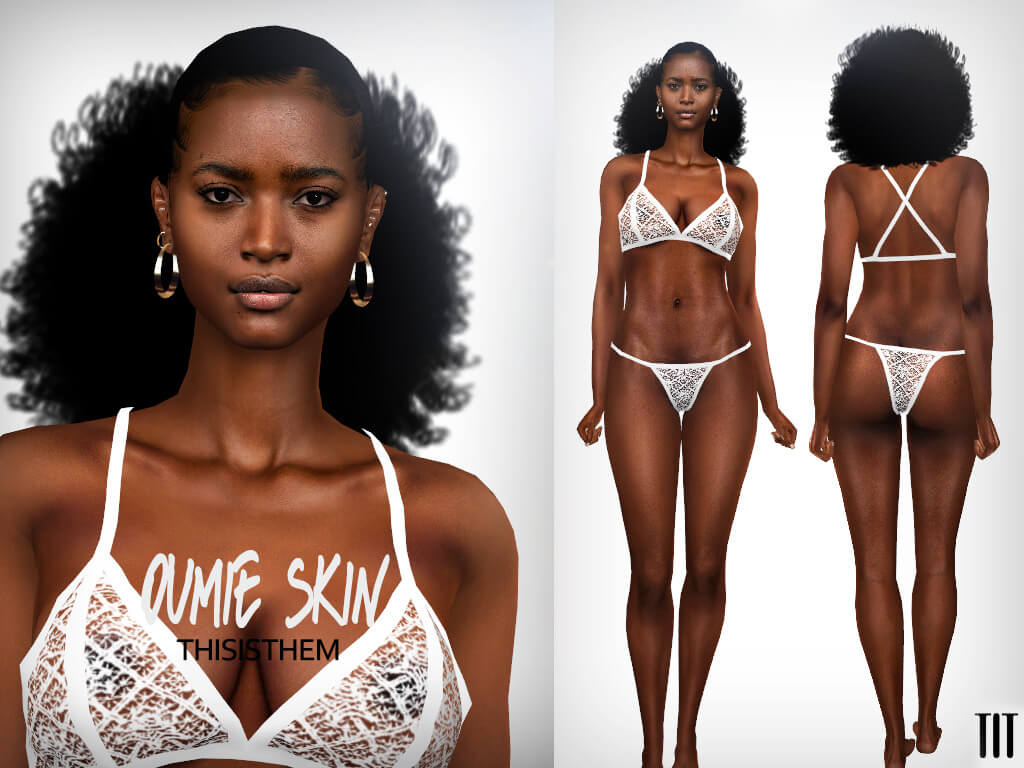
High-Definition Skinblend and Semi-Realistic CAS Complexion Details
Oumie’s Skin Overlay, created by the renowned custom content artist thisisthem, is a premier complexion package that introduces lifelike anatomical definition, silky smooth facial contours, and versatile skin tones to The Sims 4. Finding custom skins that achieve realistic depth without clashing with the game’s stylized aesthetic can be challenging. Many alpha skins look overly photographic and greasy, while default EA textures often look flat and featureless. Oumie’s Skin strikes an ideal balance, delivering clean collarbone shading, delicate facial structure, and soft skin blending that looks natural under any lighting setup.
Engineered for high-end character customization, this release includes both standalone full skin tones and flexible skin detail overlays. With HQ Mod textures, multiple swatch variations, and broad support across Teen through Elder life stages, it provides an invaluable foundation for serious CAS character creators.
The skin removes baked-in eyebrows, allowing simmers complete freedom to equip any custom or vanilla eyebrow styles without duplicate hair artifacts.
Whether you are creating fashion models in Del Sol Valley, everyday suburban families in Willow Creek, or enchanting supernatural beings in Forgotten Hollow, Oumie’s Skin bestows immediate visual sophistication.
Close-up portraits showcase clean eyelid creases, subtle smile lines, and natural ear canal shading that bring Sim faces to life.
Comprehensive Package Breakdown: Swatches, Versions, and Overlays
A closer look at the technical specifications of Oumie’s Skin highlights its extensive customization options:
- HQ Textures & HQ Mod Compatible: Rendered in pristine high-resolution texture maps that capture micro-pore detailing and delicate skin highlights on high-end graphic configurations.
- Two Base Skin Versions (14 Swatches Each): Offers 28 total full skin tones spanning fair porcelain, warm honey, olive undertones, and rich ebony complexions.
- Eyebrow-Free Texture Design: Features clean bare brow bones so you can freely style your Sims with any eyebrow shape, thickness, or arch angle.
- Two Overlay Versions (5 Swatches Each): Semi-transparent overlay files located in Skin Details that blend gracefully over standard EA skin tones or other CC skins.
- Teen to Elder Availability: Fully mapped across all older age groups, preserving consistent facial anatomy as characters grow and mature over generations.
- Custom CAS Thumbnails: Distinct catalog preview icons that make switching between versions intuitive during character creation.
- Refined Anatomical Shading: Subtle clavicle, nose bridge, and lip definition that adds photographic depth without harsh painted lines.
- Universal Body Compatibility: Features smooth body shading around the torso, ribs, and collarbones that flatters standard and custom sliders.
The inclusion of overlay versions is especially valuable. Overlays let you retain EA’s base genetic color system while imparting Oumie’s refined facial shading, soft nose contours, and luminous cheek highlights onto your Sims.
The neutral undertones avoid yellowish or reddish cast errors, ensuring that characters photograph cleanly across both warm sunset lighting and cool indoor studio lamps.
Styling Ideas and Aesthetic Integration
The versatile realism of Oumie’s Skin Overlay makes it an ideal cosmetic canvas across multiple popular gameplay themes:
For modern fashion lookbooks and influencer narratives in San Myshuno, this skin creates a radiant, runway-ready complexion. Pair it with soft facial highlighters like the Highlighter Set N1-22 to produce dewy, glass-skin beauty looks that shine in close-up portrait photography.
In high-drama storytelling in Del Sol Valley, actors and celebrities gain an air of effortless glamour. The defined collarbones and delicate neck shading elevate off-the-shoulder evening gowns and red carpet jewelry.
Everyday family gameplay in San Sequoia or Willow Creek also benefits greatly. The overlay version adds just enough subtle polish to make parents, grandparents, and teenagers look vibrant and alive without appearing overly processed or artificial.
Supernatural Sims, such as vampires and spellcasters, look exceptionally striking when paired with the paler swatches, providing a smooth porcelain canvas for dark gothic cosmetics.
Simmers who use custom facial sliders will appreciate how smoothly the skin textures stretch and adapt across diverse ethnic features, jaw widths, and nose shapes without texture distortion.
Athletic Sims engaging in sports or outdoor fitness routines also benefit from the toned collarbone and shoulder definition, giving active characters a healthy, athletic vitality.
Texture Resolution and Live Mode Performance
Skin details are among the most frequently rendered assets in The Sims 4, making texture optimization essential. Despite its ultra-crisp HQ texture resolution, Oumie’s Skin is structured with clean DDS compression that renders efficiently across medium and high graphics settings.
The texture seams along the neck, shoulders, and scalp hairline are blended smoothly and cleanly. Sims moving their heads, laughing during conversations, or wearing low-cut tops will not show ugly neck seams or color mismatch lines between the face and torso.
Because the overlay functions as a 2D diffuse map layer, it produces zero polygon drag on your frame rates, allowing you to populate active neighborhoods with dozens of beautifully textured Sims without stuttering.
Recommended CAS Slider Pairings
To get the most out of Oumie’s Skin, consider pairing it with nose tip, nostril width, and eye socket sliders. The realistic highlight points on the nasal bridge and philtrum respond dynamically to subtle slider adjustments, giving each Sim unique facial individuality.
How to Download and Install
To install Oumie’s Skin Overlay, download the package files from the creator’s Tumblr post using the link below and drop them into your Documents/Electronic Arts/The Sims 4/Mods folder.
Verify that custom content is enabled in Game Options, restart your game, and head into CAS. You will find the full skins in the Skin Tones menu and the overlays under Skin Details, ready to customize your favorite characters.
Final Thoughts on Oumie’s Skin Overlay
Oumie’s Skin Overlay by thisisthem is an essential complexion CC release that elevates Sim aesthetics with lifelike depth, refined shading, and superb versatility. With 28 full skin swatches, 10 overlay variations, eyebrow-free flexibility, and HQ texture compatibility, it provides an outstanding foundation for any CAS enthusiast. If you want to give your Sims radiant, beautifully sculpted skin that looks gorgeous from every camera angle, this overlay is a must-have addition to your Mods folder.