
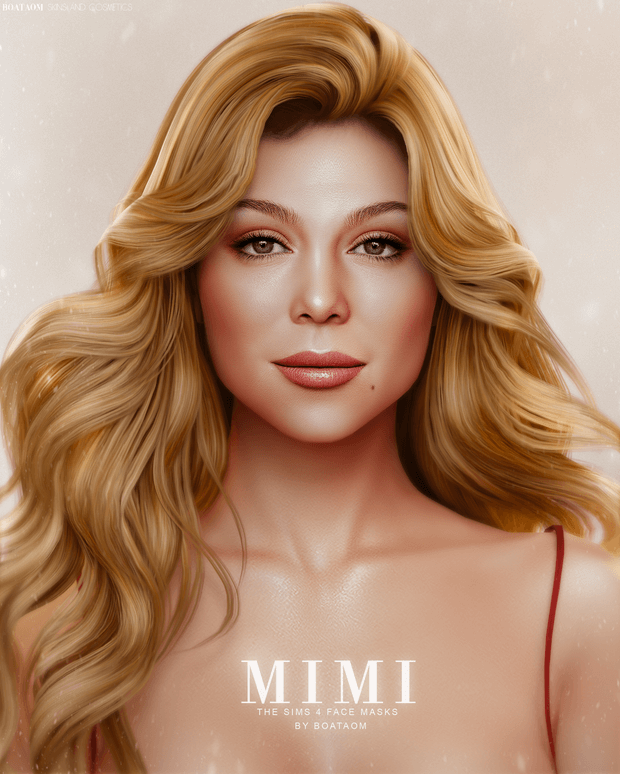
Achieve unparalleled facial realism, delicate skin textures, and natural genetic beauty in your virtual worlds with the comprehensive Mimi Face Masks and Skin Overlay package for The Sims 4. Creating truly distinctive, lifelike Sims begins with skin details. Default game skins can often appear flat, overly cartoonish, or lacking in realistic facial contours. The Mimi genetics collection provides creators with an extraordinary toolkit of nuanced facial masks, body overlays, and diverse skintones to breathe organic vitality into every Sim you craft.
Facial Realism Reimagined: The Mimi Face Mask
The Mimi Face Mask is meticulously hand-painted to capture subtle human features without drifting into the uncanny valley. It gently enhances the nose bridge, softens eyelid folds, adds lifelike lip texture, and introduces delicate blush around the cheeks and temples. The resulting facial structure maintains that beloved Sims aesthetic while injecting warmth, realism, and captivating facial depth.
One of the most practical features of this mask is its flexibility with facial hair and makeup. The creator included both “brow” and “no-brow” variations. The no-brow option allows players to freely mix and match their favorite custom eyebrows without unwanted texture ghosting or double lines, giving storytellers unlimited creative expression in CAS.
Fine pore details, subtle nasolabial contours, and soft under-eye shading are layered with expert restraint. This ensures that your Sims retain an expressive, vibrant appearance during in-game conversations rather than looking like rigid porcelain mannequins, maintaining emotional resonance in everyday gameplay.
The delicate lip mapping provides natural fullness and hydration sheen without demanding heavy lipstick layers. This makes it particularly wonderful for male Sims, natural no-makeup looks, and everyday casual aesthetics where heavy cosmetics would look out of place.
Extensive 24 Skin Tones and Body Overlay Variations
True representation and genetic diversity are essential for realistic family gameplay. The Mimi collection excels by providing a wide spectrum of 24 distinct skin tones across multiple undertones:
- Cool, Warm, and Neutral Undertones: Ranging from porcelain fair and golden peach to rich caramel, deep bronze, and velvety obsidian tones.
- Smooth Skin Overlays: Two dedicated skin overlay swatches that blend smoothly over default EA skin colors for subtle enhancement.
- 3 Distinct Body Skin Types: Varied torso and muscle definitions that let you tailor subtle athletic tones or softer natural physiques.
- Pre-Configured SimTray Character: Includes the original Mimi Sim tray files and mods list, allowing instant one-click character placement from your library.
The body textures feature soft collarbone highlights, realistic shoulder contours, and natural navel shading that looks magnificent in swimwear, casual loungewear, or evening gowns alike.
Having three distinct body definitions empowers players to depict diverse fitness journeys and body proportions accurately. From gentle athletic curves to softer natural silhouettes, each variation honors the anatomical diversity of real human beings.
Layering Versatility with Makeup and CAS Details
A frequent challenge with custom skin overlays is poor layering compatibility with existing makeup, freckles, and skin details. The Mimi collection was built specifically with layering harmony in mind. Because it is mapped cleanly onto standard UV channels, it integrates seamlessly alongside custom lipsticks, eyeliners, blushes, moles, and body tattoos.
Whether you are designing a fresh-faced teenager with glowing, youthful skin in Copperdale or a seasoned adult professional with distinguished features in Mt. Komorebi, the overlay acts as a versatile canvas that adapts gracefully to different ages and styles.
The natural gradient across the hairline and jawline eliminates awkward seam lines when transitioning to custom hairs or facial accessories. This harmonious blending ensures consistent visual fidelity across all lighting scenarios and seasons.
Storytelling and Screenshot Excellence
For custom content screenshot artists and Machinima filmmakers, lighting interaction is everything. The Mimi skin textures feature carefully balanced specular maps that prevent that unnatural oily shine under bright in-game lamps, while still reflecting a healthy, radiant dewiness under natural sunlight. Close-up CAS portraits and emotional cinematic gameplay moments look remarkably vivid and expressive.
Furthermore, legacy challenge players will enjoy how cleanly these skin details pass down through generations, allowing offspring to inherit realistic facial contours and cohesive genetic complexions over decades of gameplay.
Technical Highlights and Easy Installation
Designed for optimal stability and smooth in-game performance:
- Base Game Compatible: Operates flawlessly on all patch versions without requiring specific game expansions.
- Organized CAS Categorization: Found easily under Skin Details (Forehead, Mouth Crease, or Mole categories depending on file package).
- High-Resolution Texture Maps: Crisp details remain sharp even at ultra graphics settings and high camera zoom levels.
- Bonus SimTray Files: Easy installation of the character model into your Tray directory for quick CAS gallery access.
Elevate your Sim genetics today with the Mimi Face Masks and Skin Overlay package and enjoy breathtaking character realism in every gameplay session.
Frequently Asked Questions
Can I use custom eyebrows with the Mimi Face Mask?
Yes, the package includes dedicated no-brow options so you can apply any custom eyebrow without visual conflict.
How many skin tones are included in this download?
There are 24 custom skin tones covering cool, neutral, and warm undertones, plus 2 overlay options and 3 body types.
Where do I put the included Tray files?
Extract the .trayitem and associated files into your Documents/Electronic Arts/The Sims 4/Tray folder to load the character in your library.