
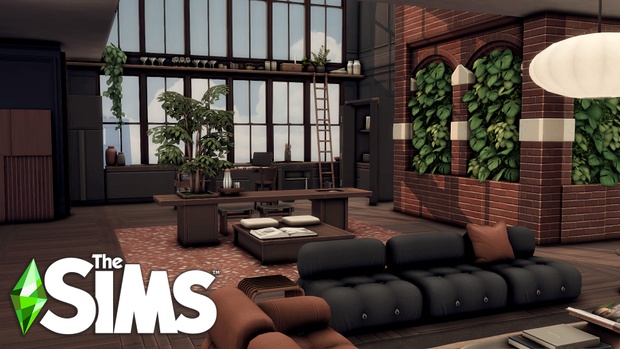
Experience the pinnacle of metropolitan sophistication, dramatic open-concept architecture, and luxurious high-rise living with the breathtaking Sims 4 CC Modern Loft Apartment build. Located at the prestigious 9 Landgraab address in San Myshuno’s Uptown district, this complete apartment renovation transforms a standard penthouse into an architectural masterpiece. Featuring double-height ceilings, industrial exposed brick, sleek black metal accents, and panoramic city skyline views, this build delivers the ultimate luxury residence for your elite Sims.
Architectural Concept and Industrial Open-Plan Design
The 9 Landgraab apartment renovation embraces contemporary industrial luxury—a design aesthetic defined by expansive open spaces, raw structural materials, and sophisticated minimalist furnishings. The build removes restrictive interior partition walls to create a sweeping, double-height great room where floor-to-ceiling glass windows flood the entire living area with natural city sunlight. Towering exposed brick accent walls and matte black steel beams provide structural drama, anchoring the apartment’s sleek urban identity.
A dramatic mezzanine loft overlooks the main living salon, connected by a floating industrial staircase with glass balustrades. This elevated upper floor houses the private master suite, creating a seamless separation between glamorous entertaining spaces below and peaceful sanctuary above.
Curated Living Zones and Luxury Amenities
Every square meter of this high-rise loft is meticulously furnished and decorated to support rich gameplay storylines:
- Gourmet Chef’s Kitchen: Features a massive waterfall marble island, integrated professional stainless-steel appliances, and custom wine display shelving.
- Sunken Living Salon: Outfitted with an expansive modular velvet sectional sofa, contemporary gas fireplace, and a sleek modern art gallery wall.
- Executive Home Office: Situated in a quiet alcove with panoramic skyline views, custom built-in bookshelves, and a high-end designer executive desk.
- Primary Penthouse Suite: The mezzanine bedroom features a king-sized platform bed, open walk-in wardrobe, and a spa-inspired en-suite bathroom with a freestanding soaking tub.
- Balcony Cocktail Lounge: An outdoor terrace perfect for stargazing through high-powered telescopes, sipping champagne, or hosting chic evening cocktail parties.
Technical Highlights and Game Optimization
Crafted by an expert lot builder, the Modern Loft Apartment ensures smooth gameplay and pathfinding:
- 100% Playtested Routing: Thoroughly tested with multi-Sim households to guarantee that all doorways, staircases, and kitchen counters feature unobstructed pathfinding.
- Optimized Clutter Placement: Carefully curated decorative clutter that provides a warm, lived-in atmosphere without causing frame rate stutter on high-rise lots.
- Dynamic Lighting Optimization: Configured with soft warm interior lights and directional spotlights that highlight architectural features during night cycles.
- Standard Tray File Format: Easily imported into your game via the in-game Library without complex installation scripts.
High-Rise Storytelling and Career Roleplay
This luxury penthouse provides the perfect setting for high-powered San Myshuno narratives:
- The Tech Mogul or Investor: House your billionaire startup founder or venture capitalist in the ultimate symbol of corporate success.
- The Renowned Art Curator: Transform the towering great room walls into an exclusive private exhibition space for rare paintings and sculptures.
- The High-Fashion Influencer: Use the sweeping skyline windows and designer furniture as a photogenic backdrop for social media streams and lookbook photos.
Installation Instructions and Tray File Setup
To install the Modern Loft Apartment, download the tray files and CC list from the creator’s Patreon post via the link below. Extract the tray files (.trayitem, .bpi, .blueprint) directly into your Documents/Electronic Arts/The Sims 4/Tray folder. Place any required custom content files into your Mods folder. In-game, travel to 9 Landgraab in San Myshuno, open your Library, check “Include Custom Content”, and place the lot directly onto the apartment lot.
Metropolitan Living and Penthouse Entertaining
Living in San Myshuno’s Uptown district is all about status, ambition, and unforgettable social gatherings. The Modern Loft Apartment at 9 Landgraab is engineered specifically for entertaining. The open-plan layout allows dozens of guests to mingle effortlessly between the sunken lounge, the marble bar island, and the breezy outdoor balcony without causing Sims to get stuck in doorway routing bottlenecks. Your Sims can host political fundraisers, high-fashion launch parties, or intimate romantic dinners overlooking the glittering city lights below.
During rainy or stormy weather, the massive floor-to-ceiling windows provide a dramatic view of lightning flashing across the San Myshuno skyline, making time spent relaxing inside feel truly cinematic and luxurious. It stands as a crown jewel in any city-living save file, providing the ultimate environment for ambitious high-rise careers.
The apartment also features smart clutter and lighting balance, ensuring that visiting guests, catering staff, and family members move freely without pathing delays or simulation lag during large social events. It represents an exceptional luxury addition to any Simmer’s architectural portfolio in San Myshuno, bringing modern industrial penthouse perfection to life.
Frequently Asked Questions
Which lot does this apartment build replace?
This renovation is specifically designed for 9 Landgraab in the Uptown district of San Myshuno (City Living expansion required).
Do I need to enable moveobjects before placing the lot?
Yes, it is highly recommended to enter the cheat bb.moveobjects on before placing the apartment from your Library to preserve all decor placement.
Where do I put the downloaded build files?
Tray files belong in your The Sims 4/Tray folder, while any associated .package CC files must be placed in your The Sims 4/Mods directory.