
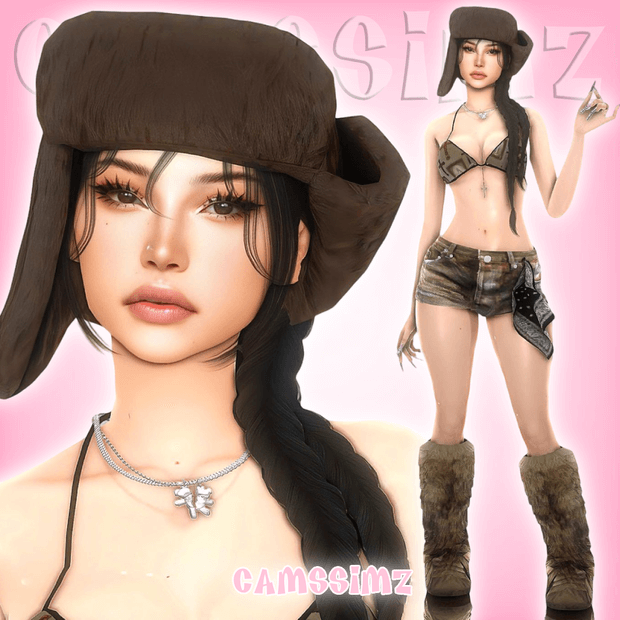
Character creation in The Sims 4 represents one of the most rewarding yet time-intensive aspects of the simulation experience, often requiring hours of meticulous slider adjustments, skin detail blending, and wardrobe curation. While generating random avatars in Create-A-Sim often produces unharmonious results, discovering beautifully sculpted pre-made Sims complete with tray files and bundled custom content allows players to drop charismatic, photogenic characters directly into their neighborhoods. The Jade Sim custom character package delivers a fully fleshed-out female avatar sculpted with delicate facial proportions, custom skin overlays, bespoke hairstyles, and a complete head-to-toe wardrobe lookbook. Today at sims4update, we review this charming character release, evaluating facial bone sculpting, bundled CC organization, gameplay readiness, and storytelling potential.
Whether you need a charismatic new roommate for your university dormitory in Britechester, a stylish fashion influencer walking the streets of San Myshuno, or a captivating romantic partner for legacy households, Jade is ready to enrich your virtual world. Let us inspect her facial sculpting, included CC assets, and installation workflow in comprehensive detail.
Artisanal Facial Sculpting and Complete Bundled Custom Content
The defining highlight of Jade Sim is the exquisite balance of her facial features. The creator avoided the generic “same-face syndrome” common in pre-made avatars, crafting an expressive, nuanced face that balances gentle soft curves with defined bone structure.
Key technical specifications and features of the character package include:
Jade’s facial aesthetics feature a luminous complexion enhanced by delicate skinblends and subtle nose contouring. Her eye makeup emphasizes soft winged eyeliner paired with realistic 3D eyelashes that flutter naturally during conversations.
Her signature hairstyle features soft, flowing waves that frame her cheekbones with effortless beauty. The hair color coordinates seamlessly with her natural eyebrow arch, giving her face cohesive warmth.
Her wardrobe styling leans into modern casual chic. Her Everyday outfit pairs high-waisted denim with a relaxed cropped top and clean sneakers, striking an authentic balance between trendy street fashion and relaxed comfort.
Her Formalwear ensemble features an elegant evening gown with delicate accessories, ensuring she looks right at home at prestigious galas, award ceremonies, and milestone celebrations.
Having all required custom content bundled directly within the download zip eliminates the tedious “missing CC hunt” that often frustrates players when downloading custom avatars.
Installation Guide and Library Placement Workflow
Installing Jade into your game is straightforward thanks to the creator’s clean archive organization. Following standard modding best practices ensures she appears immediately in your Create-A-Sim library.
Step-by-step installation instructions include:
Once placed in your household, Jade retains all her custom sliders, makeup layers, and styled clothing without missing texture checkered glitches or bald scalp bugs.
Players can customize her personality traits, aspirations, and voice sliders to match specific storytelling needs, whether shaping her into a creative artist, ambitious chef, or adventurous botanist.
Virtual photographers capturing portraits will love how effortlessly photogenic she is from every angle, producing magazine-quality screenshots under natural in-game sunlight.
In-Game Live Simulation and Character Testing
During active gameplay testing, Jade demonstrated complete simulation stability. Her facial animations during conversations, laughter, cooking, and emotional moodlets flexed naturally without vertex pinching.
Interacting with world objects—such as playing musical instruments, painting on easels, and socializing in coffee shops—fired smoothly with standard animation rigs.
Her genetics pass down gracefully to offspring. When starting a family legacy with Jade, children inherit her delicate bone structure and expressive eyes with natural biological charm.
Performance remains completely frictionless. The bundled assets are optimized for fluid framerates, ensuring smooth performance even in crowded community lots.
Frequently Asked Questions
Are all custom content items included in the download?
Yes, all required hair, skin overlays, makeup, and clothing packages are bundled directly inside the zip archive for complete convenience.
Where do I place the tray files?
The tray files (.trayitem, .hhi, .sgi) must be extracted into your Documents / Electronic Arts / The Sims 4 / Tray folder, while package files go into the Mods folder.
Why isn’t Jade showing up in my Gallery library?
Ensure that you have checked the “Include Custom Content” checkbox under the advanced filter options on the left-hand panel of your in-game Library.