
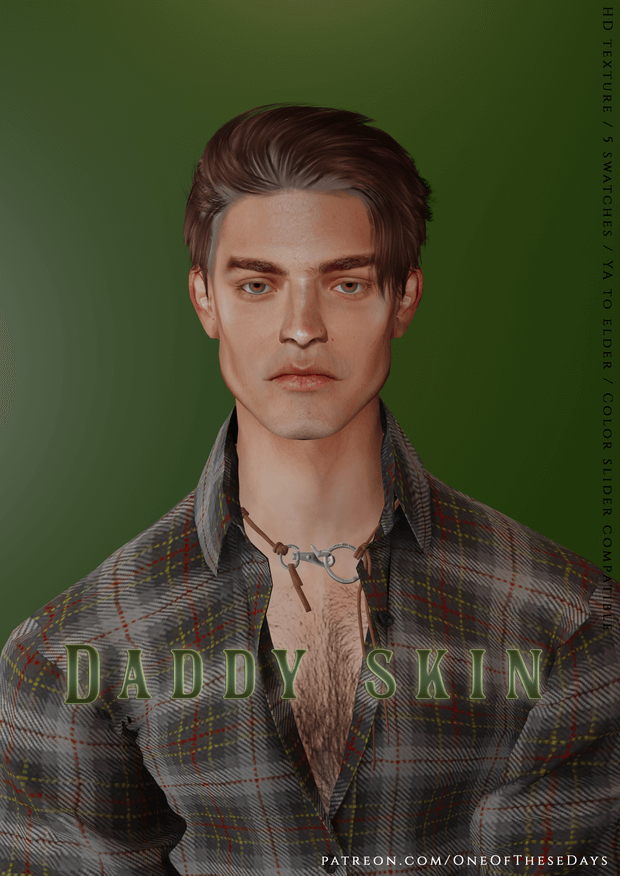
Creating handsome, mature masculine characters in The Sims 4 frequently requires custom skin details that go beyond the youthful, porcelain aesthetics of standard Maxis textures. Authentic facial lines, defined facial hair shadows, subtle crow feet, and realistic abdominal anatomy add immense depth to storytelling, letting players portray seasoned patriarchs, rugged outdoorsmen, or charismatic professionals. The Daddy Skin and Tray Files package delivers an ultra-high-definition masculine skin overlay accompanied by pre-sculpted tray files for immediate gameplay. Today at sims4update, we review this realistic skin package, analyzing its muscle definitions, texture fidelity, slider compatibility, and character setup.
Whether you are designing a charismatic corporate CEO living in an upscale penthouse in San Myshuno, a hardworking carpenter building a homestead in Chestnut Ridge, or an affectionate father raising twins in Willow Creek, this skin overlay transforms masculine character creation. Let us examine its anatomical shading, swatches, and technical features in detail.
Realistic Anatomical Shading and High-Definition Skin Details
The Daddy Skin overlay brings exceptional realism to mature masculine characters through careful anatomical modeling and nuanced shadow placement. Unlike basic smooth skins, this custom texture highlights facial bone structure, defined collarbones, subtle chest definition, and authentic torso contouring.
Key technical specifications and design features include:
The facial shading establishes mature jawline definition, subtle smile lines around the mouth, and gentle eye creases that give characters warmth and distinguished authority. Instead of exaggerating wrinkles to make characters look elderly, the overlay strikes a handsome balance ideal for distinguished adults in their late thirties and forties.
Across the torso, muscle shading follows real human anatomy. Pecs, obliques, and abdominal lines blend naturally into the hip bones without harsh spray-on lines. In addition, the collarbone and shoulder blades react realistically to standard in-game lighting setups.
Even on Elder Sims, the skin maintains refined dignity, smoothing out harsh Maxis default elder sagging while preserving authentic age-appropriate character marks.
The texture maps include nuanced surface pores, natural epidermal highlights, and delicate vascular detailing across the forearms and wrists. These subtle micro-details ensure that your masculine Sims look lifelike both in standard third-person live mode and during extreme close-up screenshot compositions.
Pre-Sculpted Tray Files and CAS Customization Options
One of the standout perks of this release is the inclusion of complete Tray files, giving players an instant, impeccably sculpted Sim ready to drop directly into live save files. For players who find masculine facial sculpting challenging or time-consuming, this pre-made character serves as an ideal baseline for further customization.
Creative styling ideas and gameplay uses for the character include:
Because the overlay supports color sliders, players can easily adjust opacity and hue. You can lower the skin detail transparency to 50 percent for a subtle enhancement over standard game skins, or dial it to 100 percent for dramatic photorealistic rendering.
The skin detail also layers smoothly beneath custom beards, stubble, body hair overlays, tattoos, and scars without graphic bleeding or unwanted color discoloration.
The package remains completely compatible with default replacement skin mods, non-default overlays, and popular adult gameplay frameworks without generating script errors or texture corruptions.
In addition, facial animations during expressive conversations, laughing spells, and emotional moments flex naturally with the skin mesh without awkward texture warping around the cheeks or brow bones.
Installation Guidelines for Package and Tray Files
Proper installation requires placing the package files and tray files into their respective subdirectories within your Electronic Arts folder.
Follow these quick setup instructions to ensure everything displays correctly:
With this skin overlay in your game, your mature masculine Sims will stand out with unmatched depth, handsome facial features, and lifelike physical presence during both everyday interactions and cinematic screenshot sessions.
Frequently Asked Questions
Where can I locate the skin overlay inside Create a Sim?
The Daddy Skin is located under the Skin Details section within Create a Sim. Depending on the version package, it occupies the Forehead, Freckles, or Skin Tones category, allowing you to layer it freely with custom makeup, facial hair, and tattoos.
Do I need to install both the package files and tray files?
If you only want the skin texture to apply to your own Sims, you only need the package file placed in your Mods folder. If you wish to use the pre-sculpted character shown in promotional screenshots, you must also place the tray files inside your Tray directory.
Is this skin compatible with in-game skin tone sliders?
Yes, the skin overlay fully supports native skin tone sliders, allowing you to adjust hue warmth, coolness, and brightness saturation to match any character aesthetic you envision.