
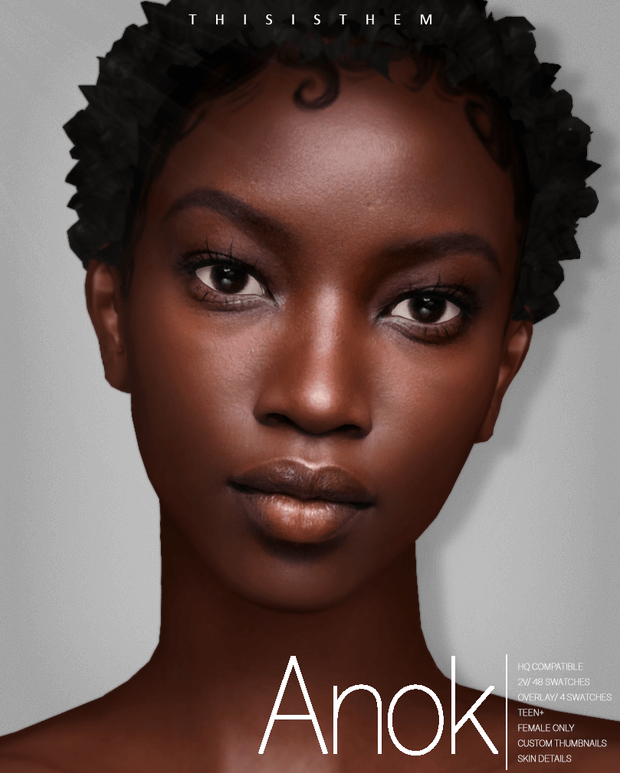
Skin details and realistic facial overlays form the foundational canvas of every expressive character created in The Sims 4. Vanilla skins often suffer from flat shading, washed-out undertones, and a lack of micro-texturing that leaves characters looking somewhat cartoonish. High-quality custom skin packages introduce realistic clavicle contours, natural nasolabial shading, subtle lip definition, and diverse undertones. The Anok Skin and Sim package offers a comprehensive skin overhaul featuring forty-eight base swatches and versatile overlay options. Today at sims4update, we review this detailed skin package, evaluating its anatomical realism, swatch range, overlay flexibility, and compatibility.
Whether you are designing a high-fashion runway model, a rugged athletic adventurer, or a realistic everyday family member, this skin set elevates facial features with subtle elegance. Let us examine the texture quality, anatomical depth, and versatility of this standout skin release.
Anatomical Realism and Detailed Micro-Texturing
The Anok Skin was engineered to deliver believable anatomical realism without crossing into unnatural uncanny territory. The texture work preserves clean Maxis Mix balance while introducing sophisticated lighting and depth cues.
Key technical specifications and skin features include:
- Forty-Eight Base Swatches: An expansive tonal range accommodating deep dark, rich warm, golden olive, neutral beige, and fair porcelain undertones.
- Four Specialized Overlay Swatches: Transparent skin detail overlays that blend with any default or non-default EA skin tone.
- Skin Details Categorization: Placed conveniently under Skin Details, preventing conflicts with makeup, tattoos, or clothing layers.
- High-Definition Textures: Optimized for ultra-crisp display under HQ Mod environments as well as standard graphics settings.
- Teen Through Elder Support: Fully compatible with male and female characters from teenage years through elderly life stages.
- Custom In-Game Thumbnails: Clearly labelled thumbnails that make choosing the right tone and opacity effortless.
The facial shading defines the bridge of the nose and philtrum naturally, creating dimensional contours that catch sunlight gracefully during outdoor gameplay.
Around the eyes, subtle tear trough shadows and delicate eyelid creases prevent character gazes from appearing flat or painted on.
The clavicle and collarbone shading along the chest adds elegant anatomical structure, particularly when characters wear low-cut tops, swimwear, or formal evening gowns.
Subtle pore textures and natural skin sheen across the cheekbones provide radiant glow without looking greasy or overly specular under bright interior lamps.
The torso and arm texturing includes soft muscle definition that complements both slender and muscular character body presets.
The texture mapping across the collarbones and shoulder blades transitions smoothly into back muscles, providing continuous anatomical realism when characters wear backless dresses.
In addition, the subtle lip definition eliminates the chalky appearance often seen when Sims do not wear lipstick in the vanilla game.
Versatile Skin Overlay Functionality and Tone Blending
A major advantage of the Anok release is the inclusion of four dedicated overlay swatches alongside the forty-eight standalone base tones.
While standalone skins replace the underlying tone completely, skin overlays act like translucent photographic filters that adapt to your Sim existing EA skin slider settings. This allows you to retain unique custom genetic tones while gaining the detailed contours and realistic shading of the Anok set.
The overlays work harmoniously with custom blush, contour powders, and highlighters, giving beauty enthusiasts a reliable canvas for advanced makeup styling.
Because the skin sits in the Skin Details category, your characters retain their custom appearance across all outfits without resetting during showers, swimming, or sleeping.
The author also included a pre-styled Sim package that demonstrates how to pair the skin with complementary hair, eyes, and eyebrows for maximum visual impact.
The textures blend cleanly at the neck seam, avoiding the visible tone discoloration line that frequently plagues poorly mapped skin details.
This seamless neck blending makes the skin ideal for storytelling close-ups and portrait photography in virtual modeling magazines.
The overlay opacity is calibrated so that freckles and beauty marks beneath remain softly visible, adding to the individuality of each family member.
Storytelling and Character Creation Potential
Investing in a high-caliber skin detail drastically improves screenshot photography and storytelling immersion in every corner of your game.
Close-up conversational portraits look dramatically more expressive, capturing nuances in smiles, frowns, and surprised reactions with rich depth.
For legacy challenge storytellers, passing subtle facial features and realistic skin textures down through generations makes family trees feel remarkably cohesive and lifelike.
Whether you are creating dramatic supernatural vampires in Forgotten Hollow or everyday families in San Sequoia, this skin provides unmatched versatility.
It remains one of the most reliable and aesthetically balanced skin sets available for Simmers who appreciate nuanced character beauty.
Its natural tones and balanced lighting response ensure that your characters always look radiant and healthy in every lighting condition.
Installation Guide for Skin Details
Follow these simple instructions to install the Anok Skin and Sim into your game:
- Download the package and tray files via the pink download button below.
- Place all .package files into your Mods directory located at Documents / Electronic Arts / The Sims 4 / Mods.
- If installing the pre-made Sim, place the tray files into Documents / Electronic Arts / The Sims 4 / Tray.
- Confirm in Game Options that custom content and script mods are enabled.
- Open Create-A-Sim, navigate to Skin Details, and apply the Anok skin or overlay to your characters!
Ensure your graphics settings have uncompressed sim textures checked for the highest visual clarity during in-game photography sessions.
Frequently Asked Questions
Is the Anok Skin a default replacement or non-default?
The Anok Skin is a non-default custom skin and skin detail overlay. It will not overwrite your original game skins and can be selected manually in Create-A-Sim.
Can male characters use this skin package?
Yes, while styled primarily on female models, the skin overlay swatches can be applied to male Sims by removing the masculine CAS tag filter.
Does this skin work without the High Definition HQ Mod?
Yes, the textures are fully compatible with standard game resolutions and will look sharp and beautiful even without the HQ Mod installed.