
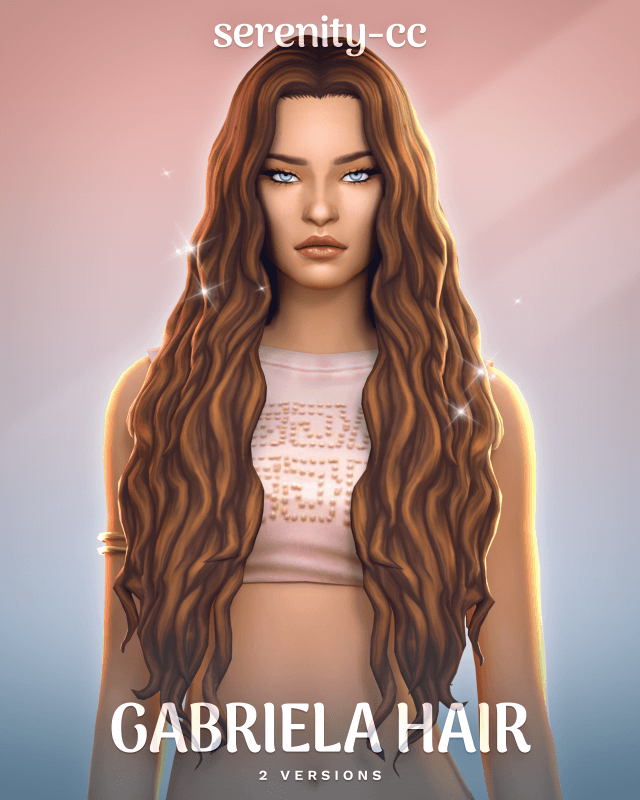
Sometimes, a new hairstyle is all it takes to give a Sim a completely different look. You can keep the same outfit, makeup, and accessories, but changing the hair can make a character feel more romantic, casual, elegant, or expressive. If you enjoy creating Sims with natural-looking curls and longer hairstyles, Gabriela Hair CC for The Sims 4 is a custom content option worth checking out.
Gabriela Hair is a long, curly hairstyle created by a custom content creator who wanted to experiment with a different hair design. The creator describes the project simply: every now and then, they enjoy working on hair, and this time they decided to make a long, curly style. That personal approach gives the release a straightforward appeal for players who are always looking for new ways to customize their Sims.
The hairstyle comes with custom thumbnails, uses the default EA hair color palette, and is compatible with the base game. It is designed for female Sims from Teen to Elder and is also hat-compatible. The listing mentions two versions of the hairstyle, although the available description does not explain exactly how those versions differ.
For players who regularly spend time in Create-a-Sim (CAS), these details are useful. You can browse the hairstyle using its custom thumbnail, choose from the familiar EA hair colors, and explore how the curls work with different outfits and accessories.
In this review, we’ll look at the Gabriela Hair CC’s main features, the advantages of its compatibility options, and how you could style it for different Sims and occasions.
What Is Gabriela Hair CC in The Sims 4?
Gabriela Hair is a custom-content hairstyle designed for players who want to expand their Sims’ hair options beyond the standard game selection.
Its defining feature is its long, curly design. Long hairstyles can create a strong visual impression in CAS, while curls introduce texture and movement to a Sim’s overall appearance. Together, those elements offer a different styling direction from short cuts, straight hairstyles, or tightly controlled updos.
The hairstyle is intended for female Sims from Teen through Elder, making it an option to consider for several life stages. It is also base game compatible, so the creator does not list a specific expansion pack as a requirement.
Another detail worth noting is that Gabriela Hair comes in two versions. Having multiple versions can be useful when a creator offers alternatives for the same hairstyle, but the supplied description does not specify what distinguishes these files. Before downloading, check the creator’s preview images and installation notes to determine which version suits your preferences.
Rather than focusing on an elaborate collection of accessories or unusual color options, Gabriela Hair keeps its main appeal centered on the hairstyle itself: long curls, familiar EA colors, and practical compatibility features.
Long Curly Hair: Why It Works for Different Sim Styles
Long curly hair can fit into a surprising range of character designs. Depending on the hairstyle’s exact shape and the way you style the rest of the Sim, it can work with casual clothing, romantic outfits, or more polished looks.
The Gabriela Hair CC offers an option for players who want to introduce curls into their Sims’ wardrobes without changing their entire fashion aesthetic.
Create a Natural Everyday Look
If you prefer Sims who look as though they are ready for an ordinary day rather than a formal photoshoot, a long curly hairstyle can be a useful starting point.
You could pair Gabriela Hair with jeans, a simple top, and understated accessories for a relaxed everyday outfit. Alternatively, you could combine it with a comfortable dress for a softer appearance.
The idea is to let the hairstyle contribute texture and personality without making the rest of the outfit unnecessarily complicated.
This can be particularly useful when creating townies or updating an existing household. A new hairstyle can help refresh a Sim’s appearance while allowing you to keep the clothing and accessories you already like.
Build a Romantic CAS Look
Long curls can also complement romantic styling.
If you enjoy creating Sims for relationship storylines, dates, or family-oriented gameplay, you could experiment with Gabriela Hair alongside dresses, delicate jewelry, and coordinated makeup.
You do not need to use an elaborate outfit to make this combination work. A simple color palette and a few carefully selected accessories can help create a cohesive look.
The hairstyle could also be useful for screenshots where you want a character’s appearance to feel softer or more expressive. Try several combinations in CAS before deciding which outfit best suits your Sim’s personality.
Use It for Everyday and Formal Outfits
One advantage of adding a versatile hairstyle to your Mods folder is that you can experiment with it across different outfit categories.
For example, you could use Gabriela Hair for a Sim’s everyday outfit and then test it with a more formal dress. Depending on the hairstyle’s shape and how it interacts with the clothing, you may find that it works for more than one occasion.
It is worth checking the hairstyle with your preferred accessories, especially if you use a large collection of custom content. This helps you see how the hair looks with the outfits you actually use rather than relying only on the creator’s preview.
Two Versions of Gabriela Hair: What Should You Know?
The creator’s description states that Gabriela Hair is available in two versions. This is useful information for anyone browsing the download, but the distinction between the versions is not explained in the supplied text.
It would be misleading to assume that one version has more volume, different bangs, altered textures, or another specific feature without seeing the original listing.
Instead, check the creator’s download page for a comparison of the two options. Preview images may help you identify the differences and decide which version you prefer.
If the creator provides separate files, read the installation instructions carefully so you know whether to choose one version or whether both are intended to be used together. Avoid installing duplicate or conflicting versions unless the creator explicitly recommends doing so.
Taking a moment to check these details can save time if you maintain a large custom-content collection.
Custom Thumbnails: Easier Hairstyle Browsing in CAS
Gabriela Hair includes custom thumbnails, another useful feature for players who have accumulated a lot of custom content.
When your Mods folder contains dozens or hundreds of hairstyles, finding a particular item can become frustrating. Custom thumbnails help identify a creator’s content in the game’s interface, making it easier to recognize the hairstyle while browsing CAS.
This is especially helpful if you frequently switch between different hairstyles when creating new Sims or updating existing characters.
Custom thumbnails do not change the hairstyle’s appearance on the Sim itself. Their main purpose is to make the item easier to identify in the interface.
If you enjoy maintaining a carefully organized CC collection, recognizable thumbnails can make the overall process of creating and editing Sims more convenient.
Default EA Hair Color Palette: Familiar Color Choices
Another confirmed feature of Gabriela Hair is its use of the default EA hair color palette.
For players who prefer familiar hair colors, this can make the hairstyle easier to incorporate into existing character designs. Rather than relying on a separate custom palette, the hairstyle uses the standard EA color options.
Match the Hair to Your Sim’s Existing Appearance
Hair color is an important part of a Sim’s overall look. It can influence how clothing, makeup, and accessories appear together.
Using the default EA palette gives you a familiar set of color choices to work with when styling Gabriela Hair. You can experiment with different available shades and decide which one best complements the character.
For example, you might choose a color that coordinates with your Sim’s everyday wardrobe or select a contrasting shade to create a more noticeable appearance.
The supplied description does not list the individual colors or confirm whether additional recolors are available separately. Check the creator’s previews if you want to see exactly how the hairstyle looks in each swatch.
Why a Familiar Palette Can Be Useful
A standard color palette can be convenient when you want to maintain consistency across several Sims.
If you are creating a family, a group of friends, or an entire neighborhood, using familiar hair colors can make it easier to coordinate appearances without having to learn a separate palette for each hairstyle.
It can also simplify your styling process if most of your existing hair CC uses EA colors.
Base Game Compatible: No Specific Expansion Pack Required
One of the most practical features of Gabriela Hair is its base game compatibility.
The creator lists the hairstyle as compatible with the base game, meaning a specific expansion pack is not identified as a requirement for using it.
This is good news for players who own only the base game or prefer not to purchase additional packs simply to expand their CAS options.
It can also be helpful if you share Sims with other players who have different collections of expansion packs. A base-game-compatible hairstyle may be easier to use in different setups, although the receiving player’s game version and custom-content configuration can still matter.
As with any CC download, compatibility should not be confused with a guarantee that the file will work perfectly after every game update. If you experience problems, check the creator’s latest information and test the hairstyle without other potentially conflicting custom content.
Hat Compatible: More Flexibility When Styling Outfits
Gabriela Hair is also listed as hat-compatible.
This is a useful feature because custom hair can sometimes interact awkwardly with hats and other headwear. Depending on how a hairstyle is made, the hair may clip through an accessory or appear differently than expected.
A hat-compatible hairstyle is designed to support use with suitable hats, giving you more options when creating outfits.
You could experiment with a casual hat for an everyday look or try different headwear for a more distinctive character design.
However, hat compatibility does not necessarily mean that every hat in the game will fit perfectly. Different accessories have different shapes, and custom content can interact differently depending on the combination.
The best approach is to test Gabriela Hair with the specific hats you want to use and check the results from multiple angles in CAS.
Teen to Elder: A Hairstyle for Multiple Life Stages
The Gabriela Hair CC is designed for female Sims from Teen through Elder.
That age range gives you several ways to incorporate the hairstyle into your gameplay. You could use it for a Teen Sim developing her personal style, a Young Adult building a new life, an Adult managing a busy household, or an Elder whose appearance reflects her personality and history.
If you enjoy legacy challenges, having a hairstyle available across multiple life stages can be helpful when creating a consistent visual identity for different characters.
It also provides another option when refreshing existing households. Rather than giving every Sim the same hairstyle, you can select different colors and clothing combinations to help individual characters stand out.
The description does not mention support for children, toddlers, infants, or babies, so you should not assume that Gabriela Hair is available for those age groups.
How to Install Gabriela Hair CC in The Sims 4
If you are new to custom content, installing a hairstyle is generally straightforward. The exact instructions supplied by the creator should always take priority, especially when two versions are available.
For a typical package-file download, the general process is:
- Download the hairstyle files from the creator’s official page.
- If the download is compressed, extract the files using a suitable archive utility.
- Place the relevant
.packagefiles in your Sims 4 Mods folder. - Launch the game and confirm that custom content is enabled in the game settings.
- Restart the game if necessary and look for the hairstyle in CAS.
The usual Windows Mods folder is located inside Documents > Electronic Arts > The Sims 4 > Mods, although your actual Documents location may differ.
If the creator supplies separate instructions for the two versions, follow those directions instead of assuming both files should be installed simultaneously.
It is also a good idea to keep backup copies of important saves and test new custom content after major game updates. If a hairstyle does not appear, check the file location, the game’s custom-content settings, and the creator’s compatibility notes before assuming the download is broken.
Is Gabriela Hair CC Worth Adding to Your Game?
If you enjoy long hairstyles, curly textures, and flexible CAS styling, Gabriela Hair is worth considering.
Its strongest confirmed features are its long curly design, two available versions, custom thumbnails, default EA hair color palette, base game compatibility, hat compatibility, and support for female Sims from Teen to Elder.
These details make it a practical option to explore if you want to expand your hairstyle collection without relying on a particular expansion pack or a separate custom color palette.
However, whether it is the right hairstyle for your game ultimately depends on the actual design. Look at the creator’s original preview images to evaluate the curls, overall shape, and differences between the two versions.
You should also check the original download page for the file names, installation instructions, and any additional compatibility information. The supplied description does not identify the exact differences between the two versions or provide details about file size and other technical specifications.
Final Thoughts: A Long Curly Hairstyle for Your Sims
The Sims 4 Gabriela Hair CC is a useful option to explore if you want another long curly hairstyle for your female Sims.
Its familiar EA hair color palette makes it easy to experiment with standard color options, while the custom thumbnails can help you identify it in CAS. Base game compatibility is another advantage for players who want to expand their hairstyle choices without requiring a particular expansion pack.
The hat-compatible design also gives you more flexibility when creating different outfits, and the Teen-to-Elder age range makes it suitable for several life stages.
Whether you are creating a new household, updating an existing Sim, or simply browsing for more hair CC, Gabriela Hair offers another option for your custom-content collection.
Before downloading, take a look at the creator’s previews to compare the two versions and decide which one suits your style. With the right outfit and accessories, a long curly hairstyle can become an important part of a Sim’s overall appearance.
WickedWhims Mod and Animations
By : sims4ccworld