Modern Industrial Design and Tech Realism
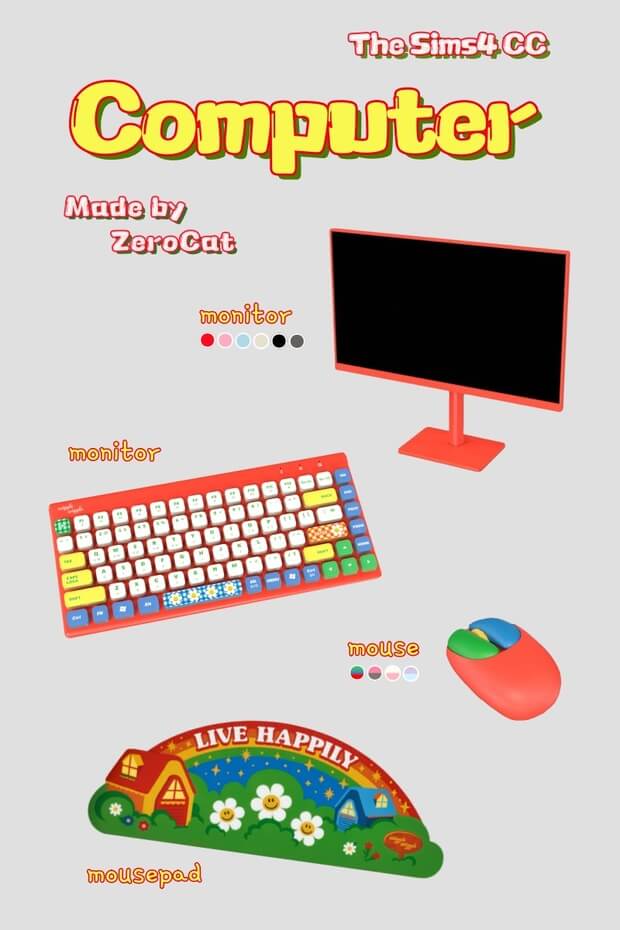
The Computet Set was created to satisfy the demand for sleek, contemporary computer setups that mirror modern real-world hardware. Rather than the thick bezels and generic plastic casings of default in-game computers, this collection features minimalist aluminum chassis, edge-to-edge frameless display monitors, and compact, high-performance desktop towers with tempered glass panels.
The attention to small hardware details is impressive. The desktop tower showcases internal component textures—such as cooling fans, graphics cards, and motherboard traces—subtly visible through the tinted side window. The accompanying peripherals include a low-profile mechanical keyboard with defined keycaps and an ergonomic wireless gaming mouse, bringing realistic clutter and authenticity to your Sims' workstations.
The monitor rests on a sturdy, minimalist stand that takes up minimal desk footprint, leaving ample surface area for study books, coffee mugs, desk lamps, and stationery clutter.
Screen Textures and Color Swatches
A standout feature of this computer set is the high-resolution texture work applied to the display screens. When Sims boot up the computer to work, browse the web, or game, the monitor displays realistic desktop interfaces, operating system dashboards, and vibrant graphic software windows rather than pixelated default blue screens.
The hardware swatches cater to diverse interior decorating palettes. Classic matte black and brushed dark gunmetal options provide a sleek aesthetic ideal for tech enthusiasts and streamers. Clean alpine white and silver aluminum swatches cater to Scandinavian minimalist offices and high-end creative studios. For simmers who love playful gaming aesthetics, pastel pink, soft mint, and lavender casing variants allow you to build adorable aesthetic battle stations.
The normal and specular maps are expertly crafted. The metallic chassis reflect ambient room lights with an authentic matte sheen, while the display screen maintains a soft semi-gloss finish that mimics real LCD and OLED monitors.
Interior Decor Integration and Build Mode Utility
The Computet Set integrates effortlessly into a variety of architectural and interior design styles in Build Mode. Found conveniently under the Electronics > Computers catalog category, these items snap cleanly to desk slots without requiring complicated bb.moveobjects positioning tricks.
For high-tech modern lofts in San Myshuno, setting up this computer system on a sleek glass or concrete desk establishes a polished, professional ambiance for software developers, freelance writers, or digital artists. The minimalist design harmonizes with industrial brick walls and modern track lighting.
For teen bedrooms and gaming streamer setups, the pastel and RGB-accented swatches allow builders to craft immersive gaming caves. Pair the computer set with LED wall lights, acoustic foam panels, a gaming swivel chair, and dual monitor clutter to create an authentic live-streaming backdrop for characters pursuing the Video Game Streamer or Tech Guru career branches.
Corporate office designers and university campus planners will also appreciate how uniformly these systems slot into shared library computer labs, research facilities, and executive corporate desks. The modern styling elevates public venues into state-of-the-art facilities that look strikingly contemporary in everyday gameplay.
Live Mode Functionality and In-Game Performance
Crucially, the Computet Set is fully functional in Live Mode. Sims can sit at the desk and interact with all standard computer interactions—including writing novels, programming plugins, playing Blicblock, chatting with friends, ordering groceries, and researching careers. The typing and mouse-clicking animations align accurately with the physical keyboard and mouse props.
The creator optimized the 3D polygon meshes with great care, ensuring that having multiple computer setups across a large household or public internet cafe lot does not degrade game performance or cause stuttering. The objects display clean custom thumbnails in the Build catalog, making them easy to identify during construction projects.
notable feature, the items look crisp even without the use of post-processing tools like Reshade, delivering exceptional visual clarity on standard in-game graphic settings.
Simmers who love designing realistic modern homes will find this computer set an indispensable build asset that breathes contemporary authenticity into every workstation. From dedicated university study rooms and creative agency offices to immersive gamer bedrooms, this hardware collection delivers realistic digital utility that elevates your architectural storytelling across multiple in-game generations. It stands as an essential technical upgrade for any contemporary digital home.
Download and Installation Guide
Adding the Computet Set to your game is fast and easy via Patreon. Click the green download button below to access the creator's post. Download the package files and transfer them directly into your Sims 4 Mods directory (Documents/Electronic Arts/The Sims 4/Mods). Verify that custom content and script mods are enabled in your Game Options menu under the Other section. Launch The Sims 4, enter Build Mode, search under Electronics > Computers, and upgrade your Sims' digital workspaces today.
Frequently Asked Questions
Is the Computet Set base game compatible?
Yes, all items in the Computet Set are completely base game compatible and require no DLC packs or expansion content to work in your game.
Can Sims perform all standard computer interactions?
Yes, the computer features full base game functionality, including web browsing, programming, writing, gaming, and career tasks.
Where can I find this set in Build/Buy Mode?
You can find the items under Electronics > Computers, or by filtering for Custom Content in the Build/Buy catalog search bar.