Charming Messy Bun Silhouette and Sculpted Strands
Exiled Hair captures the relaxed beauty of an everyday casual updo through thoughtfully balanced 3D mesh modeling:
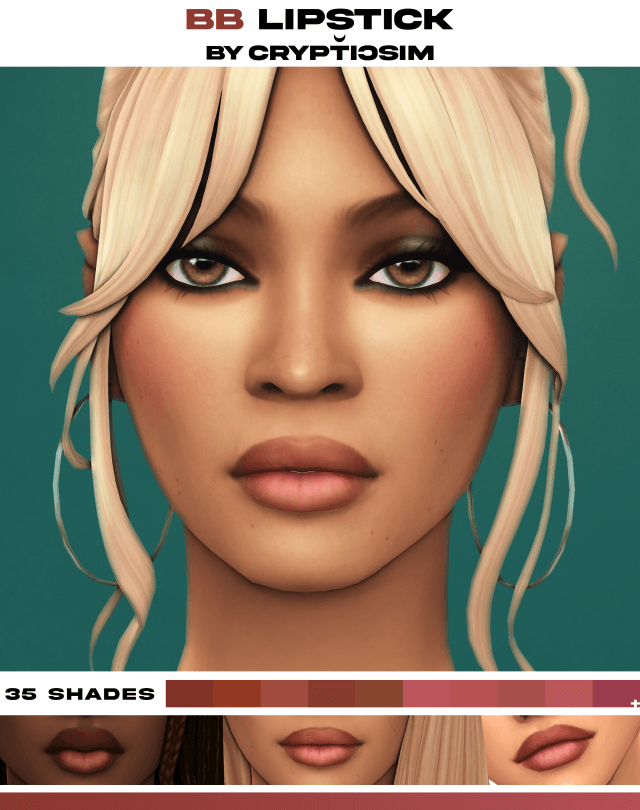
- Relaxed Crown Bun: A gathered topknot situated at the natural crown of the head, sculpted with organic clay volume and visible hair strand twists.
- Soft Whispy Bangs: Gentle forehead fringe that frames the eyebrows naturally without obscuring character facial expressions.
- Face-Framing Tendrils: Delicate loose strands cascading along the temples and ears, softening cheekbone contours and jawlines.
- Natural Hairline Transitions: Seamless integration along the forehead and nape of the neck that prevents harsh linear scalp seams.
- Hat Compatibility: Carefully modeled hat morphs that allow Sims to wear beanies, sunhats, and caps without flattening the bangs.
The mesh geometry showcases smooth edge flow that bends organically with head tilt and neck rotation animations. Unlike overly rigid hairs that clip sharply into the shoulder blades, the updo sits elevated, keeping the neck, collarbones, and upper back clear.
The texture mapping adheres strictly to standard Maxis match guidelines, featuring hand-painted clay highlights that blend seamlessly with official Sims 4 lighting and shading engines.
Universal Age Compatibility: Toddlers to Elders
One of the most remarkable accomplishments of the Exiled Hair release is its full life-stage coverage, providing tailored meshes for every age group:
- Toddler and Child Versions: Proportioned carefully to match rounder pediatric skull shapes and smaller foreheads, creating an adorable, playful look.
- Teen, Young Adult, and Adult Stages: The primary sculpted mesh designed to anchor mature everyday, athletic, and sleepwear aesthetics.
- Elder Support: Coordinates beautifully with natural grey, salt-and-pepper, and white swatches for dignified, active grandmothers.
- Extensive Palette System: Includes standard EA color swatches alongside custom vibrant tones, pastel tints, and ombré blends.
Having identical hairstyles across multiple generations allows storytellers to create charming family portraits where mothers, daughters, and toddler sisters share matching messy buns for family holidays.
Elder Sims in particular look wonderfully graceful in this updo. The wispy bangs soften age lines across the forehead, while the natural salt-and-pepper swatches bring distinguished warmth to gardening grandmothers or retired university professors relaxing at home.
The package is also compatible with high-definition texture mods, retaining its smooth gradient transitions under custom reshade presets.
Create-a-Sim Styling and Wardrobe Flexibility
In Create-a-Sim, Exiled Hair functions as a true wardrobe chameleon, complementing an enormous variety of clothing genres:
For cozy autumn styling in Mt. Komorebi, combine this hair with an oversized knit turtleneck sweater, high-waisted mom jeans, ankle boots, and dangling pearl earrings. For athletic gym workouts, pair it with sports bras, running leggings, and a gym duffle bag for an authentic post-workout aesthetic.
It pairs seamlessly with casual sleepwear, providing an authentic bedhead aesthetic when your Sims wake up on lazy Saturday mornings.
Because the hair pulls upward away from the neck, elaborate jewelry pieces like multi-layered chain necklaces, statement chokers, and large hoop earrings remain completely unobscured. It also provides the perfect backdrop for showing off ear piercings and neck tattoos.
The hair is cataloged under Hair / Updos, tagged for Everyday, Formal, Athletic, Sleep, and Hot Weather, and disabled for random townies.
Live Mode Physics and LOD Optimization
During extensive gameplay testing across residential and community lots, Exiled Hair demonstrated flawless technical stability. Sims engaged in vigorous athletic workouts, swimming, cooking, and social interactions without visual hitches.
Head movements during dramatic conversations, animated storytelling, and emotional reactions remain completely natural. The strands do not wobble erratically or clip through character cheeks during high-intensity expressions such as hearty laughter, angry shouting, or surprised gasps. This anatomical stability makes Exiled Hair an outstanding choice for Machinima creators and dialogue-heavy gameplay.
The creator incorporated complete LOD models (LOD0 through LOD3). When panning the camera across neighborhood parks or viewing active Sims from a distance, the hair retains its organic volume without popping or texture distortion.
The mesh is lightweight, ensuring that households with multiple Sims sporting Exiled Hair experience zero game stutter or frame drops.
Base game compatibility guarantees that every simmer can install and enjoy this versatile hairstyle without purchasing specific packs.
Installation Steps for The Sims 4
To install Exiled Hair, download the package file from the creator Patreon post linked below. Move the unzipped .package file directly into your Electronic Arts / The Sims 4 / Mods folder. Enable custom content and mods in your game options menu, restart your game client, and find the hairstyle under Hair in CAS.
Frequently Asked Questions
Is Exiled Hair hat compatible?
Yes, the creator created custom hat morphs so Sims can wear beanies, sunhats, and caps without clipping errors.
Can toddlers and children wear this hairstyle?
Yes, Exiled Hair includes dedicated conversions for Toddlers, Children, Teens, Adults, and Elders.
Is this hair base game compatible?
Yes, the hairstyle is completely base game compatible and requires no expansion packs or stuff packs.
Download Exiled Hair CC
Add effortless beauty and universal age compatibility to your Sim hair collection. Download Exiled Hair via the direct Patreon link below.