3 Distinct Styles and Precision Grooming Cuts
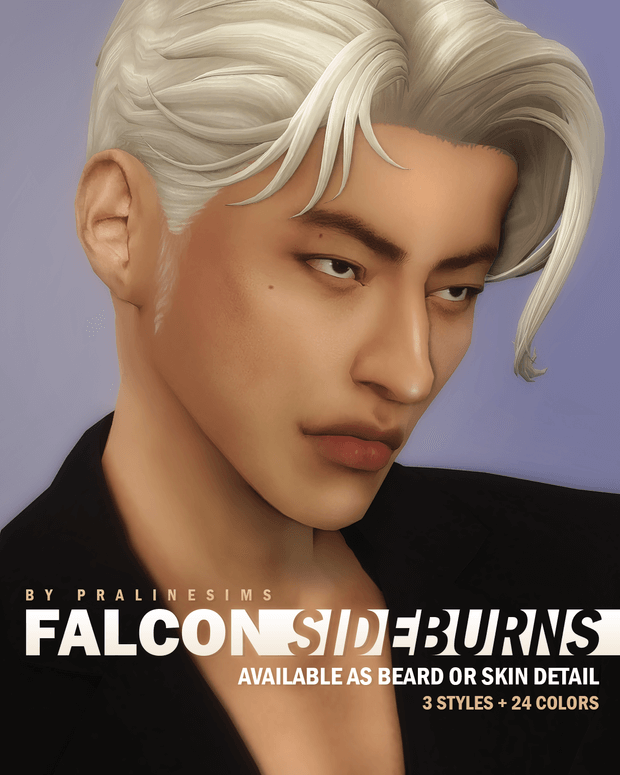
Falcon Sideburns offers three custom cut variations to cater to different eras, subcultures, and character aesthetics:
- Style 1 (Subtle Tapered Sideburns): A refined, trimmed cut that extends just past the earlobes, ideal for modern professional gentlemen and clean everyday grooming.
- Style 2 (Classic Medium Length): A fuller vintage cut inspired by 1970s rock legends and mid-century detectives that frames the cheekbones with rugged poise.
- Style 3 (Bold Flared Chops): A dramatic, wider sideburn that flares along the jawline, suited for historical Victorian gentlemen and retro rockabilly enthusiasts.
- Feathered Texture Edges: Soft gradient opacity along the perimeter that mimics natural follicle growth rather than a blunt painted-on decal.
- Sculpted Cheek Contouring: Follows natural facial contours without stretching when Sims speak, smile, or yawn.
The texture mapping utilizes a sharp Maxis match texture style that blends seamlessly with official EA hair swatches. Strand density is carefully balanced to look natural up close without causing jagged pixel artifacts.
The creator crafted dedicated bump maps that give the sideburns subtle tactile three-dimensionality, catching low-angle sunlight with convincing realism.
The grooming lines remain crisp across varied jawline presets and custom face sliders.
Dual Category Placement and Layering Flexibility
One of the most thoughtful and ingenious features of Falcon Sideburns is its dual-category distribution:
- Beard Category Version: Operates as a standard standalone facial hair item under the Facial Hair / Beards menu.
- Skin Detail Version (Body Scars): Cataloged under Skin Details, allowing players to layer the sideburns simultaneously with other vanilla and custom beards.
- Universal Frame Support: While the beard version is tagged for masculine frames from Teen to Elder, the skin detail version works seamlessly on both feminine and masculine frames.
- Simultaneous Installation: You can keep both package versions in your mods folder without conflict.
This layering capability unlocks tremendous creative potential. You can take a standard vanilla goatee, chin strap, or stubble shadow and layer the Falcon Sideburns on top via the skin detail category to create entirely unique, custom facial hair combinations.
For historical storytelling across decades challenges or Victorian legacies, combining the skin detail mutton chops with vintage handlebar mustaches produces authentic nineteenth-century gentlemen portraits that look completely hand-tailored for period gameplay saves.
The skin detail version also ensures that your Sim's signature sideburns remain intact across all outfit categories, including bath and towel outfits where standard facial hair sometimes glitches.
24 EA Color Swatches and Matching Harmony
Falcon Sideburns comes equipped with 24 color swatches that match the expanded official EA hair palette perfectly:
- Standard Natural Colors: Warm golden blonde, platinum, rich chestnut brown, jet black, dark auburn, and fiery copper.
- Mature Grey and Salt-and-Pepper: Multiple grey variations that allow mature fathers and elder patriarchs to maintain distinguished facial hair.
- Creative Fashion Dyes: Vibrant shades including emerald green, midnight blue, purple, and pastel pink for eccentric rockstars and spellcasters.
The color tones align precisely with official hair hex values, eliminating the annoying shade mismatch where custom facial hair looks darker or lighter than the hair on your Sim's head.
Custom CAS thumbnails allow you to distinguish between the three styles and choose the perfect length effortlessly.
Live Mode Stability and Facial Animation Performance
During extensive live-mode testing across multiple neighborhoods, Falcon Sideburns performed with complete technical perfection. Sims smiled, laughed, chewed food, and expressed angry grimaces without the texture sliding off the jawbone.
The texture adheres cleanly to the facial mesh regardless of whether Sims have full rounded cheeks, chiseled hollow cheekbones, or wide angular jawlines. Dynamic lighting from outdoor sunsets and indoor fireplaces illuminates the facial hair naturally without odd glowing specular artifacts.
The package is completely lightweight and base game compatible. Both versions are disabled for random townie generation to prevent unplayed background Sims from spawning with mismatched chops.
Frame rates remain completely unaffected even when multiple Sims with custom facial hair gather in crowded gym lots or local pubs.
Installation Steps for The Sims 4
To install Falcon Sideburns into your game, download the package files from the creator Patreon link below. Move the package files directly into your Electronic Arts / The Sims 4 / Mods folder. Enable custom content and script mods in your game options, launch your game, and locate the sideburns under Beards or Skin Details in Create-a-Sim.
Frequently Asked Questions
Can I layer these sideburns with other beards?
Yes, by using the skin detail version, you can layer Falcon Sideburns over any vanilla or custom content beard.
How many style cuts are included?
Falcon Sideburns includes 3 distinct style options: subtle tapered, classic medium vintage, and bold flared chops.
Are Falcon Sideburns base game compatible?
Yes, both the beard and skin detail versions are completely base game compatible and require no DLC.
Download Falcon Sideburns CC
Elevate your masculine Sims with authentic vintage chops and versatile beard layering. Download the complete Falcon Sideburns CC via the direct Patreon link below.