
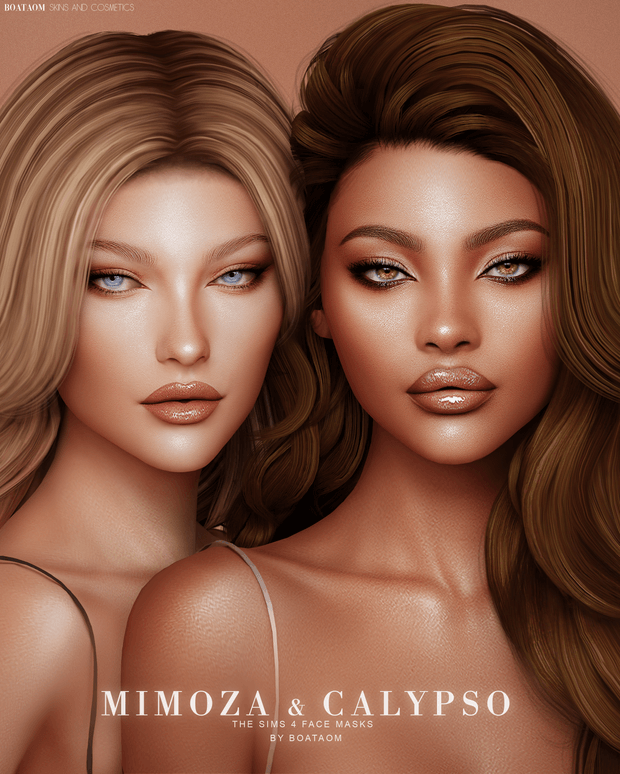
Achieve unparalleled character depth, photographic realism, and nuanced facial sculpting with the magnificent Sims 4 CC Mimoza & Calypso Face Masks and Skin Overlay collection. Finding comprehensive skin packages that seamlessly bridge facial detailing with full anatomical body shading is a top priority for custom content collectors. Delivering two distinct artistic skin overhauls—Mimoza and Calypso—this masterwork release includes 52 total skin tones, brow and browless options, multiple body skin types, and full custom Sim tray files.
Two Distinct Artistic Visions: Mimoza and Calypso
This release provides two complete cosmetic and genetic systems, each tailored to distinct aesthetic moods:
- Mimoza Skin Suite (24 Skin Tones): Focuses on soft, glowing porcelain and warm neutral complexions. Features delicate nasal bridge contouring, gentle eyelid creases, subtle cheekbone highlights, and smooth lip texture. Available in both with-eyebrows and browless configurations to accommodate custom 3D eyebrows.
- Calypso Skin Suite (28 Skin Tones): Emphasizes striking, sculpted anatomical definition with an expansive melanin spectrum spanning deep caramel, rich espresso, and glowing bronze tones. Features chiseled jawline shading, natural clavicle depth, and refined skin radiance.
Both suites include specialized Face Masks that sit in the Makeup or Skin Detail categories, allowing you to selectively apply the facial contours while using your favorite custom body presets or default skin replacements.
Full Body Overlays and Three Anatomical Types
In addition to face masks, the download features complete full-body skin overlays available in 2 universal skin tones across 3 distinct anatomical body types:
- Type 1 (Athletic & Defined): Highlights toned abdominal definition, sculpted shoulder blades, and natural muscle curvature.
- Type 2 (Soft & Feminine): Emphasizes smooth skin textures, gentle collarbone shadows, and soft curves without harsh muscular lines.
- Type 3 (Universal Natural): A balanced anatomical overlay providing subtle ribcage and spine depth suitable for all Sim builds.
Technical Highlights and Quality Optimization
Engineered for professional visual presentation and game stability, this collection adheres to exceptional technical standards:
- Universal Base Game Compatibility: Operates natively as standalone custom content without requiring any expansion packs.
- High-Quality (HQ) Mod Compatibility: Mapped with 2K/4K high-density UV textures that maintain razor-sharp clarity in close-up portraits.
- Included Custom Sim Tray Files: Includes full tray files for the pre-made Mimoza Sim character, allowing you to instantly place the sculpted model into your world.
- Non-Conflicting Category Slots: Slotted into skin details and makeup channels, ensuring compatibility with tattoos, freckles, and body hair.
- Clean CAS Thumbnails: Includes custom preview icons to streamline tone and overlay selection in Create-a-Sim.
Character Sculpting and High-Fashion Portrayal
The Mimoza and Calypso collections empower storytellers to create characters that rival real-world editorial fashion models. The delicate light reflection around the nose bridge, cupid’s bow, and cheekbones gives Sims an active, lifelike expression that looks mesmerizing in live mode and screenshot lookbooks. The browless options are especially valuable for players who utilize hyper-realistic custom eyebrows, ensuring zero texture overlapping or blurred brow artifacts.
Installation Instructions and Tray File Setup
To install this collection, download the package files and tray archive from the creator’s Patreon post via the link below. Place all .package files into your Documents/Electronic Arts/The Sims 4/Mods folder, ideally within a dedicated folder like Mods/Genetics/MimozaCalypso/. If you wish to use the pre-made Mimoza Sim, extract the tray files into your Documents/Electronic Arts/The Sims 4/Tray folder. Ensure custom content is enabled in Game Options, restart your game, and head into CAS to explore these stunning skin details.
Facial Anatomical Shading and Portrait Photography
What sets the Mimoza and Calypso suites apart from standard skin mods is the profound anatomical care invested in facial lighting. The custom face masks introduce subtle subsurface scattering effects around the nose, lips, and temples, mimicking how light naturally permeates human skin layers. This eliminates the flat, chalky look that often ruins in-game character portraits, giving your Sims an authentic radiant glow in both natural outdoor sunshine and controlled studio lighting setups.
Furthermore, the multiple body skin types allow players to match skin definition to their characters’ lifestyles—whether that means giving an athlete toned abdominal lines or giving a fashion model soft, elegant curves. This level of customization ensures that every Sim feels unique, alive, and seamlessly integrated into their environment.
Whether you are creating high-fashion runway models, charismatic actors in Del Sol Valley, or beloved family legacy founders, the Mimoza and Calypso suites provide an extraordinary artistic foundation that elevates your character designs to professional studio heights. The rich texture fidelity and versatile swatch options guarantee that your characters will captivate viewers across every screenshot and storytelling chapter, making them an indispensable asset for any serious character creator and aesthetic lookbook curator.
Frequently Asked Questions
Are the Mimoza and Calypso skins default replacements?
No, they are non-default skin overlays and face masks that can be applied to individual Sims without overriding game files.
Can I use these overlays with custom eyebrows?
Yes, the download includes dedicated “No Brow” options specifically designed to let your custom 3D eyebrows display cleanly.
Where do I put the included Sim character files?
The Sim character tray files belong in your The Sims 4/Tray folder, while all .package skin files go into your The Sims 4/Mods folder.