
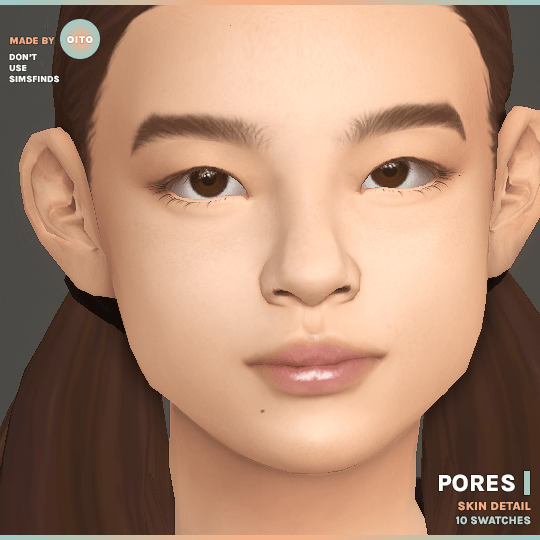
Transform your characters’ complexions and eliminate plastic smoothness with the groundbreaking Sims 4 CC PORES Skin Detail Overlay, curated by Sims4CCWorld. One of the most common complaints regarding default EA skin textures is their overly smooth, airbrushed appearance that makes Sims look like molded plastic dolls rather than living, breathing human beings. By introducing realistic dermal pores, subtle skin grain, and delicate micro-texture across the T-zone and cheeks, this skin detail mod delivers palpable realism, organic warmth, and photographic authenticity.
Dermal Texture Realism and Natural Skin Imperfections
The PORES overlay is crafted with meticulous attention to real human dermatological anatomy. Rather than applying a uniform noise filter across the face, the texture maps concentrate fine pores naturally where they appear in real life: across the nose bridge, along the upper cheeks, around the chin, and subtly across the forehead. The pore density and depth taper off softly toward the temples and jawline, avoiding an artificial or weathered look.
The overlay introduces delicate microscopic skin topography that reacts dynamically to in-game lighting. When light hits your Sim’s face in live mode or CAS, subtle ambient occlusion inside the pore indentations gives the skin tactile depth. This eliminates the flat, rubbery sheen of vanilla skins while allowing underlying blush, freckles, and skin tones to show through with realistic organic warmth.
Ten Versatile Swatches: 4 Types and Multiple Opacities
Recognizing that every Sim requires a unique level of skin texture, the creator developed 10 distinct swatches divided across 4 anatomical types with varying opacity levels:
- Type 1 (Subtle & Youthful): Ultra-fine pore distribution with low opacity, perfect for teen Sims, delicate facial structures, and minimalist lookbooks.
- Type 2 (Balanced Everyday Realism): Medium pore density across the nose and cheeks, ideal for adult Sims seeking natural, healthy skin texture.
- Type 3 (High-Definition Texture): Enhanced dermal grain with pronounced pore depth, tailored for close-up macro portrait photography and character modeling.
- Type 4 (Matte & Porous): Distinct T-zone pores designed for masculine Sims, rugged outdoorsmen, or characters with natural oily/combination skin types.
ReShade Optimization and Smart Sharpen Synergy
For custom content creators who use external post-processing tools like ReShade or GShade, this overlay is specifically engineered to synergize with sharpening shaders. The creator explicitly recommends pairing the PORES overlay with ReShade’s Smart Sharpen shader. When smart sharpening is activated, the fine pore indentations pop with razor-sharp photographic clarity, producing studio-grade character portraits that rival high-end digital sculpting software.
However, even for players running vanilla graphic settings without any shaders installed, the overlay significantly improves skin definition and eliminates plastic textures under standard ultra presets.
Technical Highlights and Quality Optimization
Engineered for maximum compatibility, the PORES overlay adheres to premier modding standards:
- Universal Base Game Compatibility: Operates natively as a standalone skin detail overlay without requiring any DLC expansion packs.
- Non-Conflicting Skin Detail Slot: Slotted into Forehead or Cheek details, allowing simultaneous layering over tattoos, freckles, moles, and default skin replacements.
- Unisex & All Life Stages: Fully functional across both masculine and feminine frames from Teen through Elder.
- Adaptive Skin Tone Blending: Utilizes clean alpha transparency channels that adapt dynamically to any default or custom skin color slider in CAS.
- Clean CAS Thumbnails: Includes custom preview icons to make finding the desired opacity swatch effortless.
Live Mode Animation and Facial Rigging
In live mode, the PORES overlay maintains flawless alignment with facial animation rigs. During conversation, smiling, frowning, or laughing animations, the pores stretch and compress naturally with the skin mesh without texture tearing, pixelation, or jagged displacement. Because it operates through lightweight texture mapping, it introduces zero memory overhead, allowing you to apply it across entire towns without performance drops.
Installation Instructions and Mod Setup
To install the PORES overlay, download the package file from the creator link below via the pink download button. Move the file into your Documents/Electronic Arts/The Sims 4/Mods directory, ideally inside a dedicated folder like Mods/Genetics/SkinDetails/. Ensure custom content is enabled in Game Options, restart your game, and navigate to Create-a-Sim to apply realistic pore texture to your favorite Sims.
Close-Up Portrait Photography and Character Depth
For custom content screenshot creators and narrative storytellers, subtle skin details make all the difference in close-up character portraits. The PORES overlay breaks up the artificial smoothness of vanilla textures, allowing facial features—such as nose contours, cheekbone highlights, and lip shapes—to look grounded and tangible. When paired with directional studio lights or soft natural window lighting, the skin catches highlights and shadows with organic realism, producing character captures that look genuinely alive.
It also provides an invaluable foundation for generational legacy families, allowing aging transitions from energetic teens to seasoned elders to feel nuanced, authentic, and emotionally compelling.
Frequently Asked Questions
Where do I find this skin detail in Create-a-Sim?
The overlay is located under the Skin Details category (under Forehead or Cheek details) in CAS.
Does this mod replace default skins?
No, it is a non-default skin detail overlay that sits on top of your existing skin tone without overriding game files.
Can I use this overlay with makeup and custom skin overlays?
Yes, the transparent alpha blending allows blush, highlighter, freckles, and custom skin overlays to layer smoothly over top.