
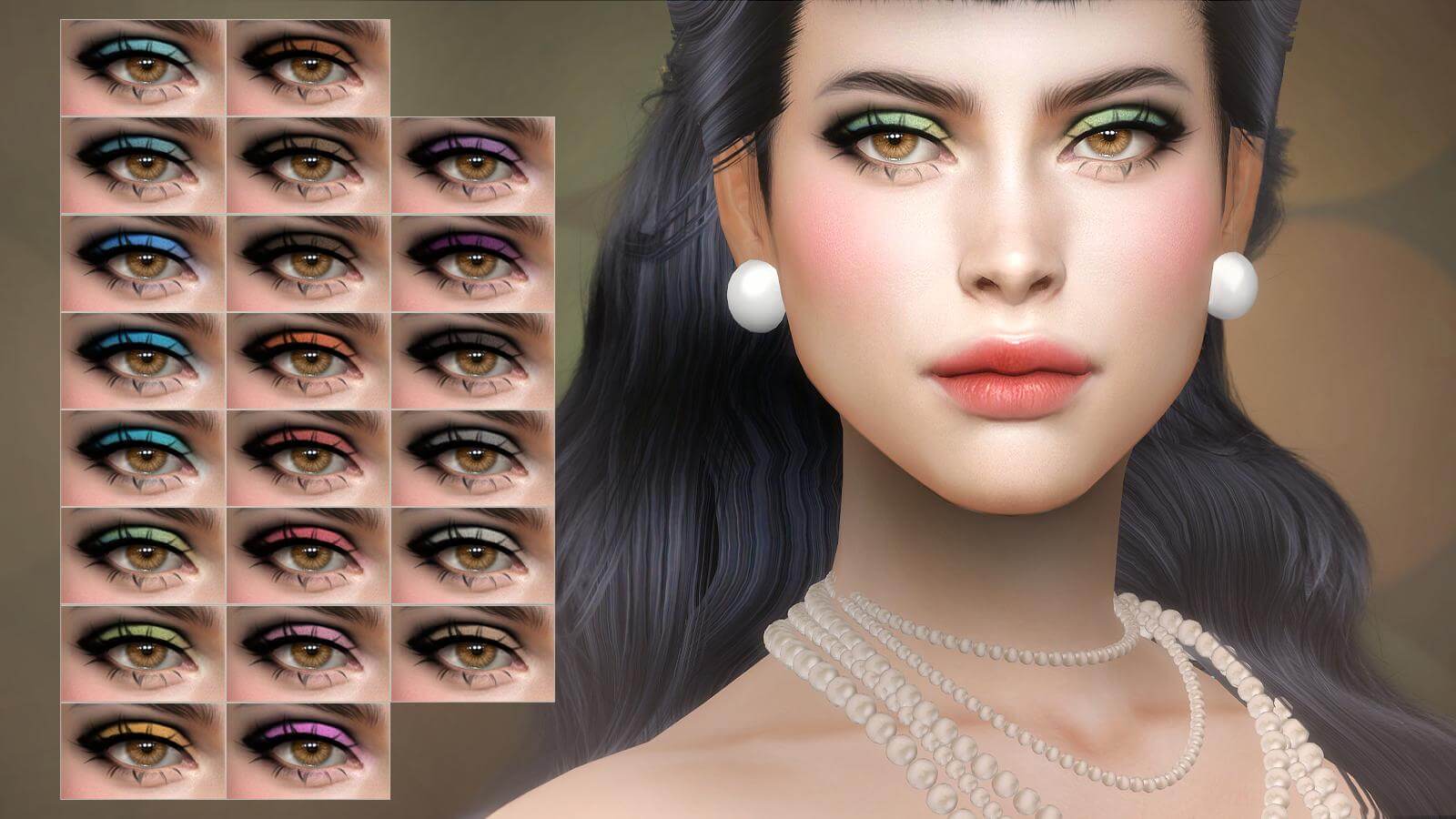
A beautifully blended eyeshadow palette has the power to transform character portraits from flat and uninspired to magnetic and expressive in The Sims 4. While vanilla cosmetic options frequently present overly saturated, opaque textures that lack gradient nuance, custom beauty creators continue to elevate digital makeup with delicate shimmer and photorealistic shading. The Rotifer Eyeshadow, created as part of the Vintage Summer collection, introduces timeless glamor through soft luminous tones and refined eyelid transitions. Today at Sims 4 Update, we review this elegant custom makeup package, examining its pigment dispersion, multi-tone color options, slider flexibility, and styling versatility.
Whether your Sims are walking high-fashion red carpets in Del Sol Valley, dressing up for a vintage ballroom dance, or establishing an everyday romantic beauty routine, this eyeshadow offers luminous refinement. In this review, we examine the gradient texture, swatch versatility, skin tone integration, and CAS slider compatibility.
Vintage Aesthetics: Luminous Shimmer and Soft Gradient Blending
The defining strength of Rotifer Eyeshadow lies in its delicate gradient formulation. Instead of a solid block of color that overwhelms the upper eyelid, the texture applies with an airy, diffused concentration along the lash line that softly fades upward toward the brow bone.
A subtle micro-shimmer layer is painted across the center of the movable lid, catching dynamic specular reflections whenever your Sim blinks or turns their head toward room lighting. This creates an optical illusion of depth that accentuates both deep-set and hooded eye shapes. The vintage inspiration shines through in the sophisticated undertones, channeling classic mid-century Hollywood glamor with modern digital texture fidelity.
The transition zone between the color wash and the natural skin barrier avoids harsh lines. By mimicking the feathered strokes of professional blending brushes, the eyeshadow provides an authentic cosmetologist finish that enhances your character’s natural beauty without looking cakey.
Curated Swatch Palette: Warm Golds, Soft Rose, and Earthy Tones
The swatch selection for Rotifer Eyeshadow emphasizes versatile, wearable beauty. The creator carefully balanced glamorous metallics with understated neutrals:
- Champagne Gold and Warm Bronze: Perfect for sun-kissed summer aesthetics, evening galas, and golden-hour bridal photography.
- Dusty Rose and Soft Berry: Romantic, feminine tones that complement blush palettes and natural rosy lip glosses.
- Vintage Taupe and Smokey Charcoal: Dramatic, smoldering shades suitable for formal dinners, nightlife parties, and vintage noir character styling.
- Sage Green and Pale Amethyst: Artistic accent colors that offer playful pops of vintage color without clashing with natural eye pigments.
- Soft Copper and Terracotta: Earthy warm shades that bring out the rich golden specks in hazel, amber, and brown character eyes.
Every swatch retains excellent color clarity across varied in-game lighting conditions. Rather than looking dull or flat under ambient room lamps, the specular finish catches the light delicately, keeping character gazes bright and alive.
CAS Opacity and Hue Slider Compatibility
One of the greatest quality-of-life enhancements in contemporary Sims 4 makeup is native slider support. Rotifer Eyeshadow responds beautifully to the game’s built-in makeup sliders, giving players complete creative control:
By adjusting the opacity slider, you can dial down the intensity to approximately 40% for an ethereal, daytime wash of light color, or push it to 100% for dramatic evening depth. The hue and saturation sliders allow you to subtly fine-tune the warmth or coolness of each swatch, guaranteeing a seamless match regardless of your Sim’s specific undertones.
Additionally, the brightness slider allows you to soften deeper jewel tones or darken pale champagne highlights, enabling dozens of custom makeup variations from a single baseline swatch file.
Because the eyeshadow is calibrated with soft feathered margins, it also works wonderfully when combined with subtle CAS skin details like eyelid creases, eye bags, and tear troughs. Rather than painting over these facial features with flat color, the eyeshadow texture accentuates your Sim’s natural facial structure, yielding rich, photographic character portraits.
Styling Pairings: Eyeliner, Lashes, and Complete Face Makeup
To maximize the visual impact of Rotifer Eyeshadow in CAS, pairing it with complementary cosmetic layers creates stunning character aesthetics:
- Delicate Winged Eyeliner: Frame the shimmering eyeshadow with a fine liquid eyeliner wing to define the eye contours and heighten vintage appeal.
- Wispy 3D Lashes: Layer with custom 3D eyelashes to give your character fluttery, dimensional lashes that don’t obscure the eyelid gradient.
- Satin Nude Lipsticks: Pair bold, shimmering shadow swatches with understated nude or rosewood satin lipsticks for a balanced, elegant face.
- Soft Highlight and Skin Details: Complement the eyelid glow with cheekbone highlighter and subtle collarbone contouring for editorial-grade screenshots.
Technical Performance and Skin Tone Integration
A common pitfall with custom eyeshadows is ashiness or chalky borders when applied to darker Sim complexions. Rotifer Eyeshadow avoids this issue entirely through well-tuned alpha transparency and balanced blend modes. On deep warm and cool skin tones, the pigment retains its rich saturation without creating strange gray halos around the orbital bone.
The texture map is cleanly optimized, ensuring crisp detail without causing memory bloat during heavy CAS gameplay sessions. It works seamlessly with both Maxis Match and alpha skin overlays.
The cosmetic layer remains stable across all zoom levels, ensuring that character portraits look sharp during dialog menus, holiday photo shoots, and family camera captures.
Download Rotifer Eyeshadow CC
Add vintage elegance and shimmering depth to your Sims’ makeup vanity with this gorgeous eyeshadow. Click the direct download button below to grab the creation:
Frequently Asked Questions
Where can I find Rotifer Eyeshadow in Create-a-Sim?
You can locate Rotifer Eyeshadow under the Makeup category within the Eyeshadow subcategory in CAS. It includes a custom thumbnail for rapid identification.
Does this eyeshadow support game makeup sliders?
Yes, the eyeshadow is fully compatible with the official Sims 4 makeup sliders, allowing you to freely adjust opacity, hue, saturation, and brightness in CAS.
Is Rotifer Eyeshadow compatible with masculine Sims?
Yes, by removing the gender tag filter in CAS, you can equip this eyeshadow on masculine Sims. It adjusts cleanly to masculine facial geometry without texture distortion.