
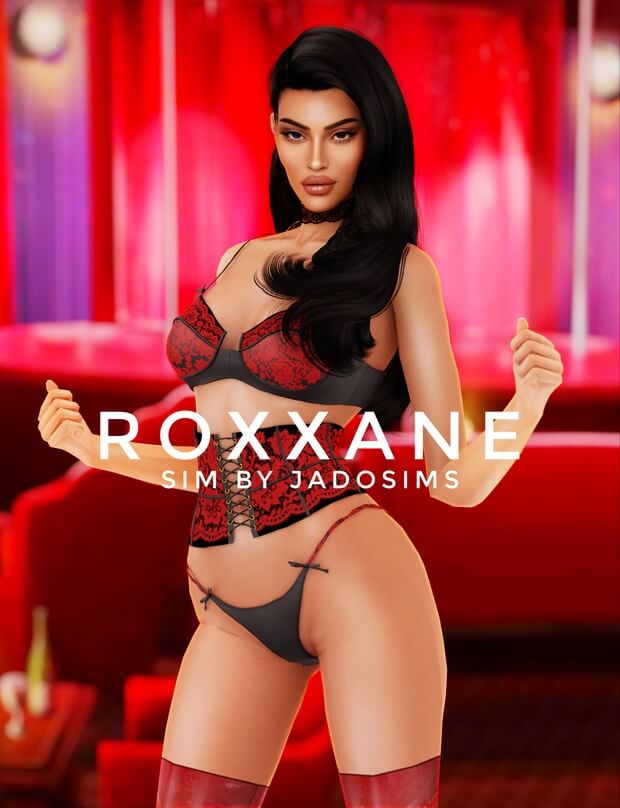
Introduce a charismatic, visually captivating new neighbor to your save files with the exquisite Sims 4 CC Roxxane custom Sim character download. Creating truly unique, editorial-grade Sims in Create-a-Sim requires hours of meticulous sculpting, facial slider adjustments, and carefully curated custom content combinations. Roxxane delivers a complete, breathtaking character design straight out of the box, offering players an unforgettable heroine, romantic interest, or fashion icon for their ongoing gameplay narratives.
Artistic Character Concept and Visual Identity
Roxxane embodies a fearless, contemporary alternative aesthetic that blends streetwear chic with sultry gothic allure. Her facial structure is sculpted with remarkable anatomical precision, featuring defined cheekbones, a subtle chin cleft, realistic mouth corners, and expressive almond-shaped eyes that command attention in every screenshot. Her styling balances edgy sophistication with magnetic charm, making her instantly stand out from generic townies generated by the game.
Whether you introduce Roxxane as a rising fashion model in San Myshuno, a mysterious occult artist in Forgotten Hollow, or an independent university student at Foxbury Institute, her distinct visual presence enriches any neighborhood storyline immediately upon moving in.
Complete Custom Content and Asset Breakdown
To replicate Roxxane’s exact visual masterpiece in your own game, the creator has provided a comprehensive manifest of high-quality custom content components:
- Skin and Facial Overlays: Features Alpha Skin N9 paired with custom body highlighters, subtle nose blush, and chin cleft detailing for radiant facial realism.
- Custom Eye Design: Realistic custom eye contacts with multi-tonal iris depth and natural catchlights that bring lively expression to her gaze.
- Makeup Suite: Includes Lip N40 paired with high-shine lip gloss, defined winged eyeliner, and soft smokey eyeshadow for dramatic allure.
- 3D Eyelash Layers: Utilizes dual 3D eyelash sets that provide feathery, voluminous lash length without pixelated texture artifacts.
- Jewelry and Piercings: Styled with custom facial piercings, layered silver chokers, and edgy ear jewelry that define her alternative personality.
- Wardrobe and Footwear: Outfitted in high-fashion streetwear pieces, including statement leather boots and modern tailored separates.
Facial Sliders and Anatomical Sculpting
What sets Roxxane apart from standard Sim downloads is the masterful use of custom facial sliders. The creator utilized custom nose sliders, mouth corner modifiers, and ear presets to achieve facial proportions that exceed the limitations of EA’s default sculpting system. The resulting profile features delicate harmony, realistic nose bridge curvature, and natural lip pout that look stunning from every camera angle.
Even if you prefer to swap her hairstyle or wardrobe for different in-game seasons, her underlying facial bone structure remains distinct and memorable throughout your entire gameplay journey.
Installation Instructions and Tray File Setup
Installing a complete custom Sim requires placing two sets of files into the correct game directories:
- Tray Files: Extract the tray files (
.trayitem,.bpi,.householdbinary) directly into yourDocuments/Electronic Arts/The Sims 4/Trayfolder. This allows Roxxane to appear in your in-game Library. - Mods / CC Files: Download the required custom content items linked in the creator’s post and place all
.packagefiles into yourDocuments/Electronic Arts/The Sims 4/Modsfolder. - In-Game Library Filter: In the game, open your Library, check the “Include Custom Content” box on the left-hand filter panel, and place Roxxane into your active world.
Storytelling and Roleplay Inspirations
Incorporate Roxxane into diverse gameplay scenarios:
- The City Living Influencer: Move Roxxane into a sleek uptown apartment in San Myshuno and launch a high-fashion social media career.
- The Supernatural Enigma: Transform her into a powerful vampire socialite or a dark spellcaster running an esoteric boutique in Glimmerbrook.
- The Campus Trendsetter: Enroll Roxxane in the Fine Arts program at Britechester, documenting her university romances and bohemian lifestyle.
Custom Traits, Aspirations, and Narrative Backstory
To fully bring Roxxane to life in your neighborhood, pairing her striking visual aesthetic with rich personality traits elevates your gameplay immersion. Consider assigning her traits such as Creative, Ambitious, and Romantic alongside the City Native or Leader of the Pack aspirations. Her narrative could center around breaking into the high-stakes San Myshuno art scene, opening an independent vintage boutique, or managing an exclusive underground nightclub in Windenburg. Her bold styling gives her an immediate sense of purpose and self-assurance from the moment she arrives in your active world.
Her expressive facial geometry also translates into deeply engaging social interactions, ensuring that whether she is flirting across a candlelit dinner or passionately debating art theory, her expressions feel nuanced, charismatic, and emotionally authentic. She quickly becomes a standout favorite character in any neighborhood she calls home, infusing fresh energy, drama, and endless storytelling possibilities into every save file.
Frequently Asked Questions
Where do I put the downloaded files to make Roxxane appear in my game?
Tray files go into your The Sims 4/Tray folder, while all .package CC files must be placed into your The Sims 4/Mods folder.
Why does Roxxane not show up in my in-game Library?
Ensure you open the left-side filter menu in your Gallery/Library and check the box labeled “Include Custom Content”.
Will Roxxane look the same if I don’t download all the listed CC?
Her facial bone structure will remain intact, but downloading the listed skin, eyes, and eyelashes is recommended for her exact signature look.