
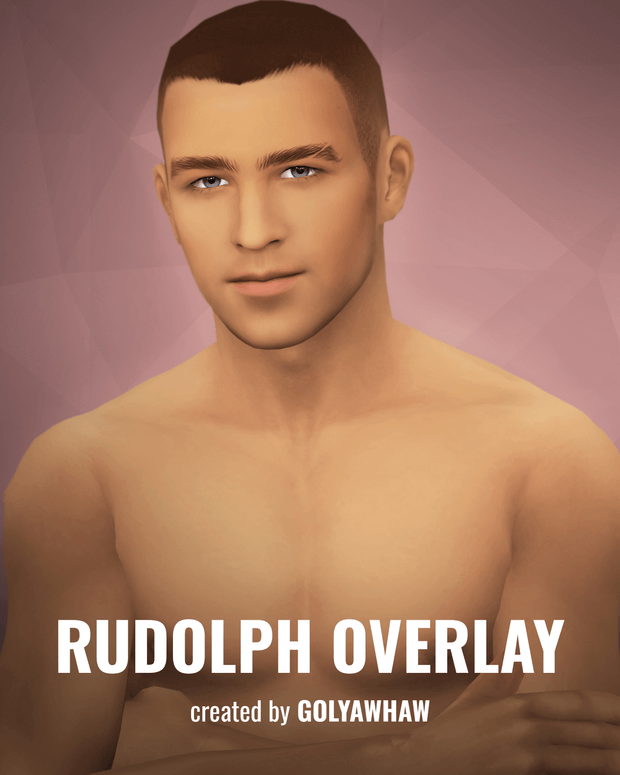
Breathe lifelike realism, soft facial contours, and natural masculine warmth into your male characters with the exceptional Sims 4 CC Rudolph Overlay. Male custom content in The Sims 4 is often underrepresented, and default EA male skin textures frequently suffer from flat lighting, muddy jawline definition, and overly harsh anatomical contours. Created as a softer, universal skin enhancement, the Rudolph Overlay delivers nuanced facial shading, realistic collarbone depth, and complete versatility for diverse character archetypes.
Soft Universal Shading and Anatomical Definition
Unlike aggressive hyper-realistic Alpha skins that can clash with the game’s stylized environment, the Rudolph Overlay was deliberately designed with a softer, universal approach. The overlay introduces subtle ambient occlusion around the eye sockets, nose bridge, cheekbones, and jawline, accentuating facial bone structure without creating harsh artificial lines. The lips receive delicate natural texture and hydration, giving your male Sims a healthy, lively appearance.
Along the neck and upper torso, the overlay defines collarbones, shoulder lines, and subtle pectorals with gentle diffuse shading. This delicate balance ensures that whether your Sim is an athletic athlete, an intellectual academic, or an everyday suburban dad, the skin enhances their natural features harmoniously.
Three Functional Swatch Configurations
The Rudolph Overlay download contains three tailored options designed to accommodate diverse player customization preferences:
- Full Coverage Swatch: Provides complete head-to-toe skin detail, enhancing facial features, neck contours, arms, and torso shading simultaneously for unified realism.
- Face Only Swatch: Focuses exclusively on facial skin details, allowing players who use custom body hair or third-party body skins to maintain complete flexibility below the neck.
- Face Only (EA Eyes): Specifically configured to preserve default EA eyes, perfect for players who prefer vanilla eyes or custom eye overrides without texture mapping conflicts.
Technical Highlights and Quality Optimization
Engineered for maximum mod compatibility and stability, the Rudolph Overlay features outstanding technical credentials:
- Universal Base Game Compatibility: Operates natively as a standalone skin detail overlay without requiring any DLC packs or expansions.
- Non-Conflicting Skin Detail Slot: Slotted into Forehead or Cheek details, allowing simultaneous layering over tattoos, freckles, facial hair, and moles.
- Adaptive Skin Tone Blending: Utilizes refined alpha transparency layers that adjust dynamically to any default or custom skin color slider in CAS.
- Full Animation Rigging: Stretches and flexes naturally with male facial rigs during conversation, emotional outbursts, and live-mode expressions.
- Clean CAS Thumbnail: Includes a custom catalog icon to make locating the overlay in your Skin Details category effortless.
Male Storytelling and Character Archetypes
The Rudolph Overlay enhances diverse male character narratives across all worlds:
- The Charming Romantic Lead: Give your bachelor Sim soft, warm facial features that look irresistible in close-up storytelling screenshots and romantic date captures.
- The Diligent Professional: Complement tailored suits and wireframe glasses with clean, refined facial shading for corporate executives in San Myshuno.
- The Rugged Outdoorsman: Pair the full coverage overlay with stubble, chest hair, and flannel shirts for rustic lumberjacks in Granite Falls.
Live Mode Performance and Visual Testing
In live mode, the Rudolph Overlay maintains clean texture rendering under all lighting presets. In bright sunlight or dim indoor lamplight, the facial contours remain soft and natural, avoiding the blotchy pixelation common in poorly compressed skin files. Because it is optimized for performance, you can populate entire towns with Sims wearing this overlay without experiencing memory bloat or FPS drops.
Installation Instructions and Mod Setup
To install the Rudolph Overlay, download the package file from the creator’s Patreon post via the download link below. Copy the .package file into your Documents/Electronic Arts/The Sims 4/Mods folder, preferably within Mods/Genetics/SkinDetails/. Make sure custom content is enabled in Game Options, restart your game, and navigate to Create-a-Sim to apply this handsome skin detail to your male Sims.
Generational Legacy and Family Resemblance
In multi-generational family saves, having subtle, high-quality skin details for male Sims is essential for creating convincing genetic lineage. The Rudolph Overlay provides clean anatomical facial shading that allows fathers, sons, and brothers to share distinct bone structure definition without looking identical. Because it is non-default and non-destructive, you can apply it selectively to family members who inherit particular chiseled features while leaving others with softer vanilla complexions.
The gentle under-eye shading and lip contouring also make aging transitions feel organic and authentic as your Sims advance from young adulthood to distinguished mature elders throughout their lifetime. It allows your characters to maintain distinguished, realistic features across every chapter of their personal life stories.
Furthermore, because the overlay utilizes optimized texture compression, it loads rapidly without causing texture popping during CAS makeover sessions or live-mode zoom transitions, making it a reliable staple for long-running family legacy save files.
Frequently Asked Questions
Where can I find the Rudolph Overlay in Create-a-Sim?
It is located under the Skin Details category in CAS (under Forehead, Cheek, or Mole slots depending on the chosen variant).
Does this overlay replace default male skins?
No, it is a non-default skin detail overlay that sits on top of your Sim’s existing skin tone without overriding game files.
Can I use this overlay alongside facial hair and tattoos?
Yes, the overlay uses clean alpha blending, allowing beards, mustaches, and body tattoos to layer naturally over top.