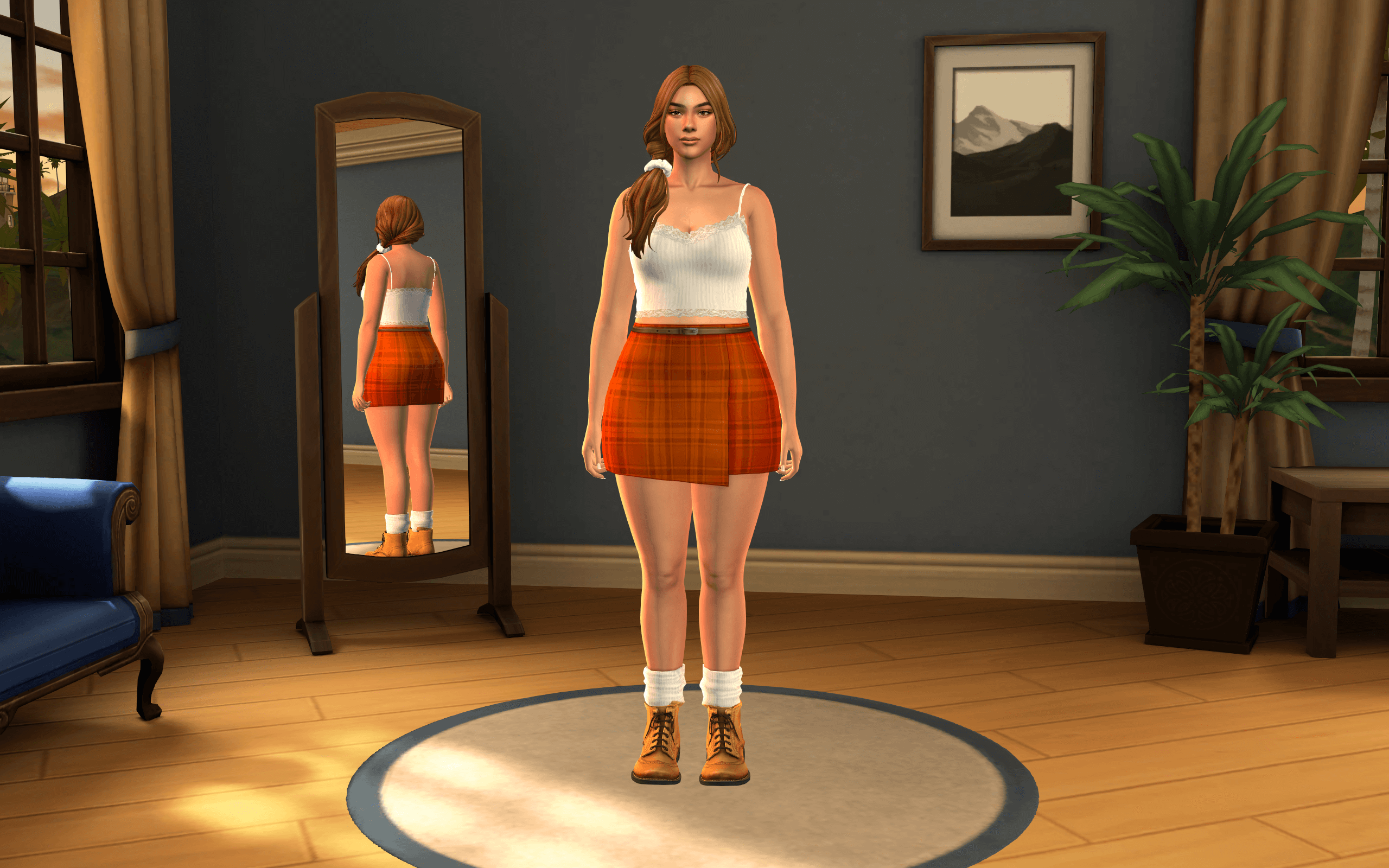
Classic TS3 Nostalgia Meets Modern 3D Meshwork
Vanilla Create-a-Sim in The Sims 4 places characters against a simple, flat gradient background with neutral, somewhat diffuse lighting. While functional, it can feel sterile during long makeover sessions. Vyxated's mod introduces a complete 3D environment boasting approximately 6,499 polygons—rendering an authentic circular stage, subtle acoustic wall paneling, and an authentic studio environment directly into the CAS viewport.
The mesh work captures the exact geometry and visual mood of The Sims 3's styling chamber:
- Authentic TS3 Room Geometry: Faithfully models the circular floor platform, backdrop textures, and soft color grading of the 2009 classic.
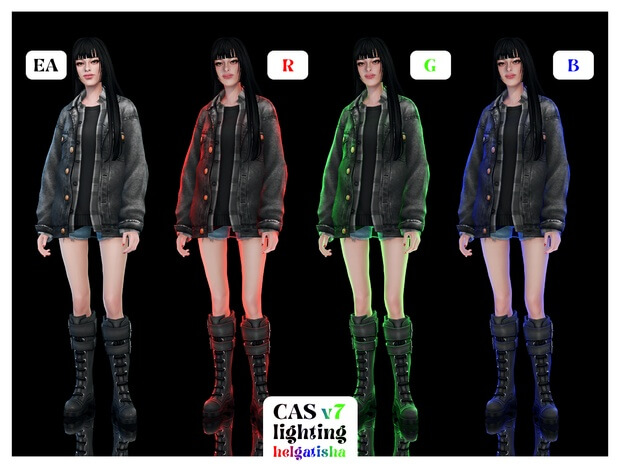
- Custom CAS Lighting Mod: Pairs the physical 3D room with custom studio lighting rigs that eliminate harsh green/blue color casts and highlight facial features evenly.
- Clean Edge Anti-Aliasing: Smooth curved platform edges that do not introduce jarring pixel jaggedness or shadow flickering.
- Enhanced Outfit Contrast: The neutral cool-gray studio backdrop makes dark clothing, vibrant hair swatches, and intricate accessories stand out with exceptional clarity.
- Lightweight Performance: At under 6,500 polygons, the room loads instantaneously without lagging the CAS camera during rotations or zooming.
For custom content creators, streamers, and screenshot artists, this background provides an impeccable, distraction-free environment to take clean lookbook captures and showcase newly downloaded wardrobe pieces.
The circular platform floor gives Sims a grounded sense of spatial presence, replacing the feeling of floating in an empty void with a professional fitting stage.
Companion CAS Lighting Mod: True-to-Life Colors
Beyond the physical stage mesh, the included CAS lighting mod is a game-changer for styling accuracy. Vanilla CAS lighting often casts unpredictable warm or cool undertones that can make choosing accurate makeup shades, hair colors, and skin tones difficult. When you take the Sim into Live Mode, colors often look dramatically different than they appeared in CAS.
Vyxated's custom lighting provides balanced, directional three-point studio illumination. Shadows fall naturally beneath the jawline and brow without obscuring eye colors or skin details, ensuring that the colors you select in CAS match what you see in the sunlit world.
Highlights glint naturally on glossy lips and styled hairstyles, while makeup blush and contour tones remain true to their intended pigmentation.
Creating Lookbooks and High-Fashion Showcases
For custom content previewers and social media creators who share styling lookbooks on Tumblr, Instagram, or TikTok, this background is an indispensable tool. Its cool, neutral tones ensure that clothing colors pop with maximum fidelity without color contamination from vibrant background wallpapers.
Because the circular stage is modeled in full 3D, full-body turnarounds and profile screenshots look cohesive from every angle. Sims casting soft ground shadows onto the circular pedestal look tangible and anchored.
The clean lines also simplify background removal or graphic editing in image manipulation software, making graphic design for CC showcases remarkably fast.
Installation and Override Conflict Rules
Because this mod functions as a direct game override, correct installation is essential for proper functionality:
- Override Rule: You must only have ONE CAS background room mod and ONE CAS lighting mod installed in your Mods folder at any time.
- Conflict Check: Before installing, check your Mods directory for any existing files named "CAS background", "blob remover", or custom CAS lighting packages and remove them.
- Folder Placement: Place the downloaded .package files into Documents/Electronic Arts/The Sims 4/Mods (placing them in the root Mods folder or a dedicated subfolder).
- Base Game Ready: The mod is 100% base game compatible and requires no expansion packs or script utilities.
Relive the magic of classic franchise styling and enjoy pristine lighting with vyxated's The Sims 3 Inspired CAS Room today.
Frequently Asked Questions
Can I use this with other custom CAS backgrounds?
No, CAS backgrounds are override mods. Having more than one background mod active will cause visual glitches or overlapping room meshes.
Does this mod impact Live Mode gameplay performance?
No, the mod only replaces the visual environment inside Create-a-Sim and has zero impact on performance during Live Mode gameplay.
Is the lighting mod required to use the background?
While the lighting mod is packaged alongside the room for optimal visuals, the background can technically function on its own if you prefer vanilla lighting.